Brave vs. F-Secure

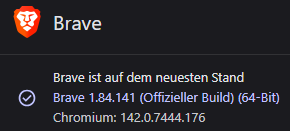
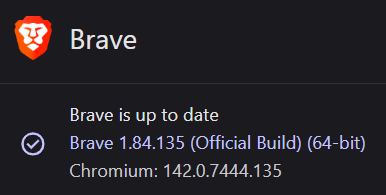
Brave: 1.84.135 (Official Build) (64-Bit)
/ Base: Chromium 142.0.7444.135
F-Secure: Version 25.10 (Total)
OS: Win 11Pro 24H2
When I start Brave with device protection enabled, it takes 30 seconds or longer to start up and open the first website. When I disable device protection, the browser starts up in about 1 second and the first page loads immediately. I have now marked brave.exe as excluded in the application and file control. Now everything works. But that can't be right. I had the same problem before with the ZEN browser, but there are no problems with native Firefox or Edge. Oh, and because I've read it here in the forum many times: No, I don't use a VPN.
I would appreciate your help!
Accepted Answers
-
@Ville Just a bit of a back story. When I was having the Brave slow start up issue (my favorite browser) on this Windows 11 laptop (now is on 25H2), I uninstalled F-Secure and used Avast Free (no Brave issues).
After seeing your post, I uninstalled Avast, used their uninstall tool, then did a manual Folder search and a Registry search for leftovers. Cleaned out the temp and %temp% files and downloaded F-Secure from the portal. There is no longer the Brave issue of long hesitations in opening Brave using the taskbar icon. All of the browsers load "instantaneously", Brave, Chrome and Edge with or without the Firewall sensor being enabled or disabled, including with or without the VPN being enabled :) I did multiple Brave starts and restarts, as well as Windows restarts and shutdowns. It's working great, F-Secure Total v25.10
If the Brave issue should ever happen again, I'll try disabling the Firewall sensor (it's enabled now).
@Chrisx3 if you wanted to try an uninstall and reinstall, that's up to you. But if you do, be sure to backup your Password Vault, unless you have another device with F-Secure to sync to. You can also use the Uninstall tool, but I've found there are always 2 folders leftover that I delete, in hidden files/ProgramData and Users/computer name/App data/Local.


Answers
-
Hi @Chrisx3
Yes, I had the same issue with Brave and F-Secure on Windows 11, you are not alone. I'm not sure of adding Brave into exclusions is a good idea, as you're probably diminishing the Scam Protection browsers ability to protect you (Brave is Chromium based, I install the extension from the Chrome store link, so there is protection there in that way as well). A mods or employees reply here would be helpful to confirm what a Google Gemini search using this phrase came up with:
Will adding a browser into an antivirus exceptions jeopardize the browsers ability to protect me while online?
When you add your browser to the antivirus exceptions list (sometimes called a "whitelist" or "exclusion"), you are telling the AV program to stop scanning or monitoring that specific application.
The primary risk is that you disable the AV's ability to scan files and network activity initiated by the browser.
- Unscanned Downloads: The antivirus may no longer scan a file that your browser downloads for malware, allowing a virus to be saved to your hard drive undetected.
- Disabled Behavioral Monitoring: If a malicious script or extension manages to exploit a vulnerability in your browser, the antivirus is less likely to detect the suspicious behavior, as it has been told to trust the browser process completely.
- Bypassed Web Shield: Some AVs have a "Web Shield" component that inspects web traffic before it even gets to the browser. Excluding the browser process can sometimes bypass this critical, real-time inspection of network traffic.
It seemed to be more of an issue on Windows 11, than my Windows 10 PC. So unfortunately, besides using a different browser, I don't have a solution for you but to maybe contact offline support, unless someone else here has an idea for you, us. Scroll down the page for chat or phone support and see what they have to say.
Kind regards.
-
Interesting. I turned off the firewall sensor. It didn't work at first, but after I disabled and then re-enabled device protection (without firewall sensor), Brave suddenly stopped causing problems. So yes, it helped (after a classic “have you tried turning it off and on again?” :)).
To me, this looks like an incompatibility between Brave and this one feature from F-Secure. Some kind of bug? Are the developers reading this and will they maybe add it to their “to-do” list? Brave isn't exactly a total oddity...
Tanks!
-
I agree, it would be nice to figure out, but in general it may still be a work in progress, especially with Brave, but at least they now have our feedback to go by. From this thread:
-
Sigh…Problem returned.
Brave 1.84.139 (Offizieller Build) (64-Bit) / Base: Chromium: 142.0.7444.163
Try reinstalling F-Secure now, will report…
-
Hello,
Sigh…Problem returned.
With "Use firewall sensor" disabled?
I think, when I got Firefox 145.0 - I started experiencing a delay with start up. Maybe about fifteen seconds. Kind of stable. Still with the next day for a while, but now all is fine. Like if the executable/launcher is no longer too much fresh and unseen.
But, I did not disable "firewall sensor" at all.
-
Perhaps troubles lies in other layers of protection then. Something like proactive monitoring of the system state and the appearance of fresh non-whitelisted executable files or any rare actions that aren't approved by default. Whereas with a clean installation, it's assumed that this is the "original" state of the system and, accordingly, there's no excessive scrutiny of activities.
or otherwise 'something' doesn't stop F Secure from performing checks quickly. 'something' that appears after a "long" time in the system.
It would still be good if they could understand/improve (if possible) such situations.
// funny if the slowdown is caused by the browser (like dissatisfaction with F-Secure's attempts to somehow infiltrate).
-
@Chrisx3 on my laptop that I did the clean install (Nov 10th), it is still loading Brave quickly, so much so that I uninstalled Avast Free from my other Windows 11 25H2 laptop and reinstalled F-Secure Total. Firewall sensor is enabled on both. We'll see how it goes for that one as well (so far so good).
Otherwise, maybe it was a fluke, an extension we're both using compared to a Brave update? On another forum, it was mentioned to have Task Manager open and when opening Brave, to see if there were any process(es), mainly F-Secure having Task Manager in name/sort order, that spike while Brave was trying to load for an extended time, as to what the culprit may be.
-
I know this isn't helpful, but maybe just a review of differences between us that could help? Brave is still loading quickly on my end. VPN and Firewall sensor are both enabled.
Brave is up to date, Windows 11 Home 25H2, F-Secure Total 25.10 (6.7.363.0), the Brave extensions I have installed: Zoom/Dark Reader/Proton Pass and F-Secure. Brave Shield is set to Aggressively Block.

Unless @Ville has another suggestion, I would consider contacting support directly, as they may want you to send them a fsdiag.zip file to read from their end to try to troubleshoot this for you. (they, employees or mods, no longer read log files on the English forum, at least it's been this way for ~6 months).
In Settings/Support you could try resetting the reputation cache.
-
Thank you for your well-intentioned support. To be honest, I would prefer F-Secure to take care of the problem. I already tried chat, but my chat was closed without comment by the other side, which was very strange.
Our configurations are the same: F-Secure and Brave versions are identical here, but Win 11 Pro 24H2.
Oh, and Thunderbird is suddenly starting up more slowly too... I'll have to see if that's also due to F-Secure.
No idea... Can anyone recommend another manufacturer? :)
-
I'm probably breaking forum rules in making a recommendation, but for a paid AV, ESET Internet Security (Security Essential) or Premium. It is one of the most stable and lightest AV's out there (I used it on and off for a year). It's a little expensive, but IMO worth it (30 day trial is an option). You would need your own password manager, though. Their forum provides a lot of support :) Bitdefender is to glitchy, to intrusive, IMO, but has a responsive forum.
For a free version, Avast which you can disable the UI notifications, gets consistent high ratings on AV-Comparatives. Malwaretips is a good forum to do a search on, a lot of feedback and reviews from the members there.
Sorry to hear about your experience with Chat, I'm not sure if phone support is free where you're at, but it's an option (you may have better luck that way).
edit: and now that I've mentioned other options, maybe a mod or employee will post to give you more advanced help? ;) :) Otherwise, us volunteers will just be guessing without a log file to read. I am assuming whatever AV you may have previously been using, was totally uninstalled, and that your not running anything else along side of F-Secure, like MBAM free version?
I'm "tapping out" of this thread and will no longer reply, there isn't anything else I can do or suggest. I wish you the best :)