FS Protection PC releases
Answers
-
-
Version 26.3 has been publicly released. Cheers :)
Released March 2026
Browsing Protection
- Block page text is now consistent across all platforms.
- Block page layout improved: the header and footer are always visible, and the page fits correctly on standard screen sizes.
- Ad Blocker's domain block list has been updated.
Improvements:
- Internal updates to improve overall code quality and security.
Bug fixes:
- Fixed a crash that could occur in the Settings.
- Fixed a rare freeze that could happen during uninstallation.
- Fixed a rare crash when resizing the app in the Vault view.
- Network error messages now look and behave consistently throughout the app.
- Task list items now display correctly with proper icons, labels, and button layout.
- Fixed untranslated text appearing in the Tasks view.
-
Release 26.4 beta 1 (7.2.174)
Improvements:
- All HTTP/3 traffic in the system is scanned and blocked if needed. Previously only HTTP/3 traffic in browsers with extension installed could be scanned.
- Settings UI/Scam Protection/Browser extensions: when a given web browser is not installed, its extension’s URL can be copied to clipboard using the new “Copy link“ button in the “Browser not found“ popup. In particular, users of Chromium-based browsers can make use of this to obtain the URL of the Chrome extension and install it to their browsers.
- Some minor text updates to unify wording with Mac/iOS/Android clients.
- VPN taking long to connect on Windows 10 with Killswitch ON
- “Search result rating” is now separate option at Settings->Scam protection tab.
Bug fixes:
- VPN connection does not succeed often after system returns from sleep (PBL-15388)
Known issues:
- Blocked HTTP/3 connections time out
- Fragmented HTTP/3 connections are not blocked
-
Release 26.4 beta 2 (7.2.278)
Improvements:
- In Family Protection, with Strict content blocking profile, the logic of blocking "Unknown" websites has been changed to be more permissive. Previously, websites would be blocked when they were unknown to Security Cloud, when obtaining their reputation information from Security Cloud failed, or when they were known but they had not been categorized as containing specific content types. Now, they will be blocked only in the latter case – when they are known to Security Cloud while not being specifically categorized, i.e. their content categories are uncertain.
-
Version 26.4 has been publicly released.
Version 26.4
Released April 2026
Browsing Protection
- Scanning HTTP/3 traffic is now system-wide. Previously it only applied to browsers with the extension installed.
- When a browser is not installed, you can copy its extension's installation URL to your clipboard using the new "Copy link" button in the "Browser not found" dialog.
- "Search result rating" toggle has been moved to a separate section under Settings -> Scam Protection to make it clearer that it affects both Browsing Protection and Shopping Protection.
Family Protection
- With the Strict content blocking profile, fewer legitimate websites will be incorrectly blocked. Only websites with genuinely uncertain content will be restricted.
Improvements:
- Minor text updates to align with other platforms.
- Fixed slow VPN connection times on Windows 10 with Kill Switch enabled.
Bug fixes:
- Fixed an issue where VPN failed to reconnect after the system resumed from sleep.
- Fixed a location info text issue for VPN feature card.
- ID Monitoring: Breached plaintext passwords, usernames and other fields are now viewable.
Known limitations:
- Blocked HTTP/3 connections time out instead of failing immediately.
- Full HTTP/3 blocking across all network conditions is not yet guaranteed.
-
Release 26.5 beta 1 (7.3.96)
Loginless activation:
- You no longer need to create an account to use the product. Instead, you will receive activation codes at your registered email address.
- You can invite other users to your subscription by email or SMS. Invited users will receive an activation code and do not need to create an account.
- Guest users are no longer divided into children and adults — all guest users in a subscription are equal.
- Web-based user management is deprecated. All user and device management now happens in the app.
Known issues:
- Extra pending invitations may appear in the People & Devices view. A new one is generated each time you sign in to the FS Protection web page with your user account.
- If a user has many devices, the device list in People & Devices may not show all of them unless the application window is made wider.
- Child users created before the update are displayed with the name "User" in the People & Devices user list.
- User name initials are hard to read due to dark text on a dark blue background.
- The "A new way to add devices" smart task does not disappear when pressing "Got it" if it is already in the dismissed tasks list.
-
you no longer need to create an account to use the product. Instead, you will receive activation codes at your registered email address.
where / how or when should I receive the activation code?
or from where / how should I get the installation file?
// who can invite other users? is it possible that 'child profile' account/installation or 'invited user account/installation' has not this option by default after upgrade?
// accessing My FS Protection portal is the way? But looks like 'way' to access My FS Protection is nowhere in current fs protection app UI (Windows).
// // okay, I think another or a proper way is public beta-participation page's form (to receive 'activation code' or create an account).
-
where / how or when should I receive the activation code?
or from where / how should I get the installation file?Anyone with existing install is automatically migrated and does not need to do anything.
If you want to install more devices to yourself or share to someone else, use the People & Devices view in the app. You can select an existing user and click "Add a new device" or create a new user by clicking "Share protection with others".
If you have lost all your app installations, you can always go to https://beta.f-secure.com, enter your email and get a new code to install for the subscription owner.// who can invite other users? is it possible that 'child profile' account/installation or 'invited user account/installation' has not this option by default after upgrade?
Anyone with permissions to do it. Right now, only the subscription owner has those permissions.
// accessing My FS Protection portal is the way? But looks like 'way' to access My FS Protection is nowhere in current fs protection app UI (Windows).
The web portal is being deprecated and it does not support this new way of installation. The only option is to use the People & Devices view in the app.
Ville
F-Secure R&D, Desktop products
-
-
Release 26.5 beta 2 (7.3.185)
Improvements:
- Unmigrated devices can now be renamed and deleted (PBL-16642)
- Blocked HTTP/3 connections are now closed promptly instead of timing out
- Fragmented HTTP/3 connections are now scanned and blocked properly
Bug fixes:
- ID Monitoring not available for migrated child users (PBL-16621)
- Migration does not complete / activation code not accepted on devices with specific network hardware (PBL-16620)
- Badly performing update of device list with many devices (PBL-16639)
- If a user has many devices, the device list in People & Devices may not show all of them unless the application window is made wider
- User name initials are hard to read due to dark text on a dark blue background (PBL-16606)
- Settings UI and Main UI: Kanji characters was shown instead of Hanzi when product installation language was Simplified Chinese (PBL-16650)
- Fixed a potential crash in Vault’s sync code generation if user tried to spam it (PBL-16555)
Ville
F-Secure R&D, Desktop products
-
Starting from browser extension version 7.3.5, it is now possible to send us feedback (a correction) if a website is improperly classified. Use the "Send us a report" button from the browser extension menu.
Currently the new extension version is being reviewed at the extension stores and only the Chrome version is available.
-
Hello,
Use the "Send us a report" button from the browser extension menu.
Regarding this fresh browser extension functionality. I just tried it with Microsoft Edge (BP Extension 7.3.6). One thing to ask:
For example, if we try to send a report offline (we can specifically reproduce the situation by opening a browser and a URL without internet access on the device; or it could happen accidentally during usual routine) - what are the actions now (or will they be)?
Such as, now, it says that ''all good and nice; we will analyze your report and fix rating/reputation/category" (rough wording of actual output in extension's menu) as when we do it 'online'.
Is the "try" somehow saved on the device (or browser session), and then is the report processed when the internet connection becomes available? Is there another approach? Or is the "report" essentially dropped, and the try is wasted, and the "output" (about "success") is simply a bogus there (as only available template/option-of-result).
// for instance, not about browser's extension, but about this fresh feature of "My Devices" (People and Devices). Looks like we cannot 'rename' device when offline. It throws connection error with wording about 'high traffic/load or maintenance. try check later' kind of reasons.
Thanks!
-
F-Secure v26.5 has been publicly released.
Released May 2025
Browsing protection feedback:
- Users can provide immediate feedback of a wrongly rated URL or undetected URL through the browser plugin with the “Send us a report” link.
HTTP/3 blocking improvements:
- Blocked HTTP/3 connections are now closed immediately instead of waiting to time out
- HTTP/3 blocking is more robust against different network conditions compared to previous release.
Bug fixes:
- Fixed: When the product language was set to Simplified Chinese, Japanese characters appeared instead of Chinese
- Fixed: A rare crash in Vault's sync code generation when triggered rapidly
-
It's such a rare case that you are browsing the internet and want to report something but right at that moment the connection is lost. The extension will show success if it queues the report to the app. App will try once to send it - if it fails, it's lost.
Ville
F-Secure R&D, Desktop products
-
-
-
@Ukko @JOnes or anyone else. I just signed up to be a Beta tester, and was sent the code to use.
My question before I uninstall my Total Subscription version is, I used the same email address as my Total subscription when I "signed up" for beta testing, is there a separate portal the beta uses, or will be in with my Total portal, or doesn't it have, or use a portal at all?
Also, I know that the VPN isn't included with the beta for some of the newer users, and understand why.
edit: also, is it worth being a beta tester if I don't and wont' use the Password Vault? I'd then just be testing the Scam Protection, Device Protection, and ID Monitoring?
TIA :)
-
Hi,
I’m no longer a beta tester myself, so I can’t say for certain how the current beta setup works.
In this case, I think the safest option would be to ask F-Secure directly how you should proceed, especially since you used the same email address as your existing Total subscription.
Personally, I would not uninstall or disable the Total subscription version before getting confirmation from F-Secure that the beta license and portal setup will work as expected.
Sorry I can’t give a more definite answer, but I’d rather not guess on something that could affect your active protection.
-
-
@JOnes and @Ville thank you for your replies, I appreciate it :)
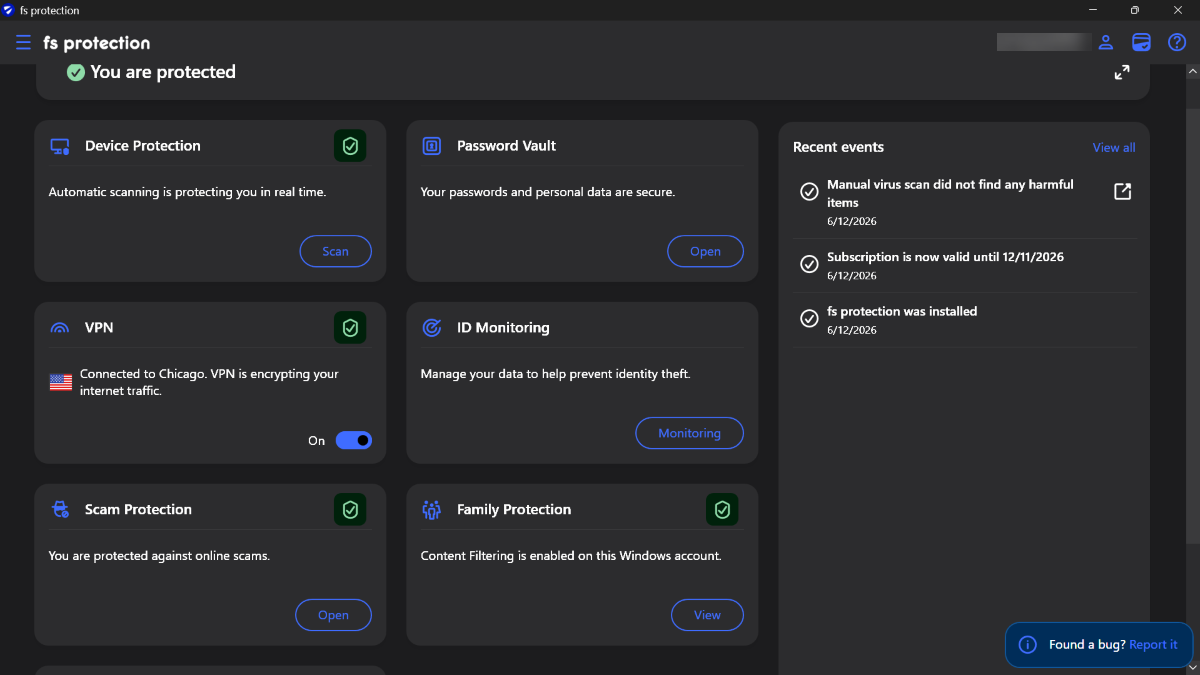
Edit: I did get everything set up. I even found a previous backup of the Vault from a year and a half ago. So I'll give that a shot and edit passwords as needed from the Proton Pass desktop app.
I appreciate that the VPN was included, as I've really liked using it here in the US, with the different server options. I have a couple of my emails entered in the ID Monitoring, and I've never used the Family Protection before, so that will be fun to explore :)
The app needed a reboot after install, to get the update to install, otherwise it was shown as failed until the restart and manually running the update. It's all updated :)I did uninstall the previous Scam Protection extensions, and used the embedded link inside the app to install them. FF was the only one to not list it as a beta on the extension page, IIRC, all others did. I did use the link from Chrome to set it up in Brave (I always have), as the protection is there, just not the site ratings when doing a Brave search. But everything installed and set up without any problems :)
-
It's such a rare case that you are browsing the internet and want to report something but right at that moment the connection is lost. The extension will show success if it queues the report to the app. App will try once to send it - if it fails, it's lost.
I also thought it could have been a sending "glitch" (so to speak) as addition to those mentioned options of 'made-up' one or 'rare case' one. Now that I understand how it works a little more precisely, sounds then, in general, there is no way to "know" whether a report was sent or not (unless the extension was unable to communicate with the app).
By technical reasons, we decided to drop category submission and it is only possible to send us new safety rating of the current url and not new category.
Sorry for a bit of 'discussion', @dukavi.
- How is the situation with the proposed rating for "unanalyzed websites" (unknown rating / uncategorized) interpreted?
I mean - If I suggest a "safe" rating for (?)-type website, will it be analyzed or categorized differently then? For reference: I've tried a couple (some even 'multiple' times) and there have been no changes so far (if should).
Or it is more like: only from 'harmful' or 'suspicious' to 'safe'; and from 'safe' to 'harmful' or 'suspicious'; or harmful to suspicious and so on?
- What about "Banking"-option?
There is one service (different domain zones: like local version and global version). Local website is categorized as Banking and stuff (with banking session activation); Global website is categorized as Banking (but will not trigger banking session per visit) too.
When we suggest "Banking" rating via BP Extension - does this mean that the bank protection will be "activated" when visiting? Or just with banking-category logo in its card?
- Does recategorization work at all now?
I tried to use F-Secure SAS recently for two websites. With partially 'no result' or confusion.
For example, certain website has "Streaming media" category (without reason; as for me). After some time I received response via email; saying something like "website is safe, alright; if there is any blocking - provide a screenshot" - I replied with screenshots like within twenty minutes of receiving letter, but got response about 'ticket is closed and so on' (SF No Reply) with even? partially broken template because of inclusion of ]]>.
So, still after some weeks - mentioned places are without changes.
Like I sent the description through the SAS form, saying basically I was more concerned with the "category/rating" than security. I included related points. Then I received a response that was kind out of 'initial' context. I responded within twenty minutes of receiving the email with screenshots (which they asked for in case there were any blocked pages), but the ticket had already been closed. I waited some weeks, thinking the email had gotten through anyway, but I don't know.
- Currently 'categorized' (say, "Dating" or five-smiles "Shopping; or specific cases like "Illegal content") website is possible to report as "Safe", "Banking", "Harmful", "Suspicious".
What happens if I report it as "Safe" (which is not available by default for just websites with a safe rating without a visible category)? I mean, some of them are likely already with 'safe' rating probably.
Does this overwrite the category? Or just trigger a double check for its safety?
// looks like it is also possible 're-report' Banking website (which has 'logo' and will trigger banking protection session) as banking.
Thanks
-
The websites are categorized in 3 major axes (in simplified terms):
- Safety – does it contain malware or other suspicious software that can try to do nasty things to your computer. Possible ratings: "safe", "harmful", "suspicious".
- Shopping trustworthiness – if you purchase something, is it likely that you will be scammed out of your money.
- Content categorization – categories like "weapons" or "streaming media", but also "illegal" and "banking", to determine what kind of content the website serves.
The behavior of the app depends on each of the axes as well as the user's selected settings.
For now we allow safety ratings and certain categories (banking) to be reported through the extension. Allowing content categories to be suggested was removed for now, since we couldn't prevent a child from reporting a new category when they get blocked. This is being looked at and may be reinstated, but we will start with the simple model for now.
Shopping trustworthiness reporting is not currently available but may be added in the future.
The reports do not automatically change anything. They are treated similarly to reports submitted through Submit a sample | F‑Secure, where a human analyst must verify any changes. This also means that a single report through the extension may not be enough to trigger an analysis of the site (we are still adjusting this).
Ville
F-Secure R&D, Desktop products
-
@Ukko answering few of your questions. Current status cannot be resubmitted, e.g. if status is "safe", then "safe" option is hidden, if status is "unknown", then user can select between safe/banking/suspicious/harmful.
"Banking" means that website will be categorized as a bank and trigger banking protection when visiting website.
As it was told, status update is not automatic process, requires additional analysis and changes are applied after confirmation only.
-
Thanks for both replies and for your answers!
I think that covers most of the things completely for me.
But just one small point (as in my previous comment - it might not be entirely clear or it might just not be that important). so,
Current status cannot be resubmitted, e.g. if status is "safe", then "safe" option is hidden, if status is "unknown", then user can select between safe/banking/suspicious/harmful.
if we use Family Protection, visit category-restricted website (and normally it is rated as "safe" page). We can also report it as safe/banking/suspicious/harmful. Does this break something? Does this make something? Since by default "safe"-option is hidden for safe-rated webpages.
As well available for manually blocked or manually allowed websites; maybe for illegal-content (per option outside family protection).
For example, often categorized (or shopping) websites will already have a safe rating (while manually blocked or allowed; illegal websites are not always).
But because of manual review of any reports - I think it is not really 'something' to think about.
// small unnecessary feature suggestion:
Is it technically possible or would it make sense to add the ability for users to choose/select/set their own score (like ouf-of-five or out-of-ten points) for the reliability or trustfulness of visited page through a browser extension and this "reporting" functionality. And, in general, store knowledge somewhere to show it.
For pages that haven't yet been analyzed (but may still be frequently visited by users), it would be clearer about the website's reliability. Maybe extended for everything else. How popular/large the site or the "brand" or "company" itself is in situations where this is unknown for user and the "safe" rating isn't so convincing. Just as a double-check or just for sure.. or just in case. Since I do not think it will complicate something too much in terms of moderation (because kind of voluntary conditional 'community'-based indicator rather than official; and does not affect anything too strong).
Even if the overall score were based solely on the "opinion" of one user - so what? It wouldn't make much of a difference if the description of this part of the rating made it clear that these were user-based thoughts. Not as a guide, but just for information.
-
Hello,
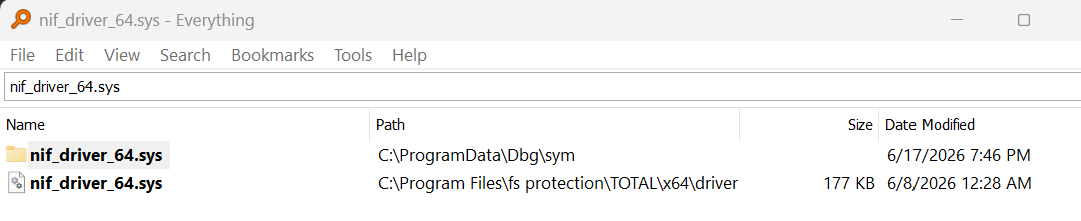
I ran into a SYSTEM_THREAD_EXCEPTION_NOT_HANDLED (7e) bugcheck caused by an access violation in nif_driver_64.sys last night ("Windows had to shut down unexpectedly"). WinDbg pointed to F-Secure, that folder location, as the Windows folder was empty. Did you want the debug zip file? I also created a fsdiag.zip file if needed. The link in the beta just opens to a browser home screen. F-Secure v26.6 beta 1.
Otherwise, this laptop, Windows 11, has been running fine for about the last hour.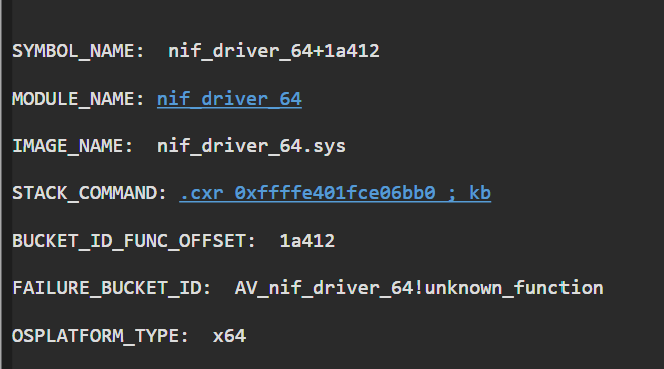
-
Please send these either through Windows specific reporting email (fsp-pc-beta-bug-report@f-secure.atlassian.net - link in the user interface) or generic beta contact email (beta@f-secure.com). Please attach fsdiag.zip and the kernel dump zip. While fsdiag should collect minidumps from system automatically, sometimes it fails to do so and the kernel dump especially is really helpful to us.
Ville
F-Secure R&D, Desktop products