
How to transfer safely files from old laptop to new laptop when old had trojan horse on it?

Hello all.
My old laptop is infected with Trojan horse virus. I have important documents I want to transfer onto the new one.
I scanned the files folder for virus with the antiviruses I have on the old laptop - RAV and Microsoft Defender. It was clean.
Then proceed to transfer the folder on USB flash drive. All good up until now.
I plug the USB flash drive on the new laptop. Before opening anything, I scan via my computer → usb flash drive → scan for viruses with F - secure. It caught the viruses. I clicked on handle all and now they are in quarantine. Performed 2 more scans on the USB and it was clean. Then also run a full scan on the new laptop and it was alright. ( By advice by live chat support I did not transfer or open anything on USB flash drive, I unplugged it ).
My question is how to proceed and how to be sure the transfer is safe?
Answers
-
Hello,
The situation is a bit tricky. But there are multiple ways to sort it out.
Anyway, firstly, there is not enough information to give completely accurate advice, and it is not entirely clear how and under what conditions you performed the actions (in particular with the USB flash drive; and what is state of your old laptop).
Then, it depends on how much time, opportunities and technical desires you have. Like something straightforward, but riskier; or risk-free, but maybe more challenging.
For example, I would probably try booting the old laptop using a "live CD" system or tool (if laptop has a CD drive) or a "live USB" system or tool. Then, by using it - I would transfer the files I need from old laptop's filesystem to a "safe" and "clean" external drive (HDD, SSD, USB, SD), which I would then use on the new laptop. With old laptop - I would do the routine offline (if technically possible), without an internet connection.
// "live CD/USB" can be there as a some generic operating system (Linux) or some kind of dedicated Rescue disk; which possible to use as bootable media.
As a long-term solution, I would probably prefer to try to cure and fix this old laptop. Again, options are: boot the system using RescueCD/Tool or any dedicated LiveOS OR scan old laptop live with more tools or scanners.
Previously, many AV / cyber security companies offered something like rescue disks, live disks or other solutions that could be used here. I do not know who still does this. More accurately, I know, but only one was able to help me recently (when I wanted to test some things). I am sure there are much more options. You just need to decide what to use, get it from an official source (after reading the instructions), and proceed carefully. There are also more specialized solutions, or the option of using a live operating system in the same way and manually trying things out.
Depending on how old your old laptop is, what operating system it is running (or how old) and whether you are still using it online, you might want just to try installing additional security solutions and scanning the system. Look at the results. Or you could use online scanners like F-Secure Online Scanner as an initial check. Then, backup required data and maybe to reinstall operating system there.
But back to your certain situation: since detection occurred only after a manual scan, then it is possible the "dangerous" files were only static; so, USB flash drive did not get any 'spreadable' malicious items from the old laptop during transfer / connection. But it is better not to run anything indeed.
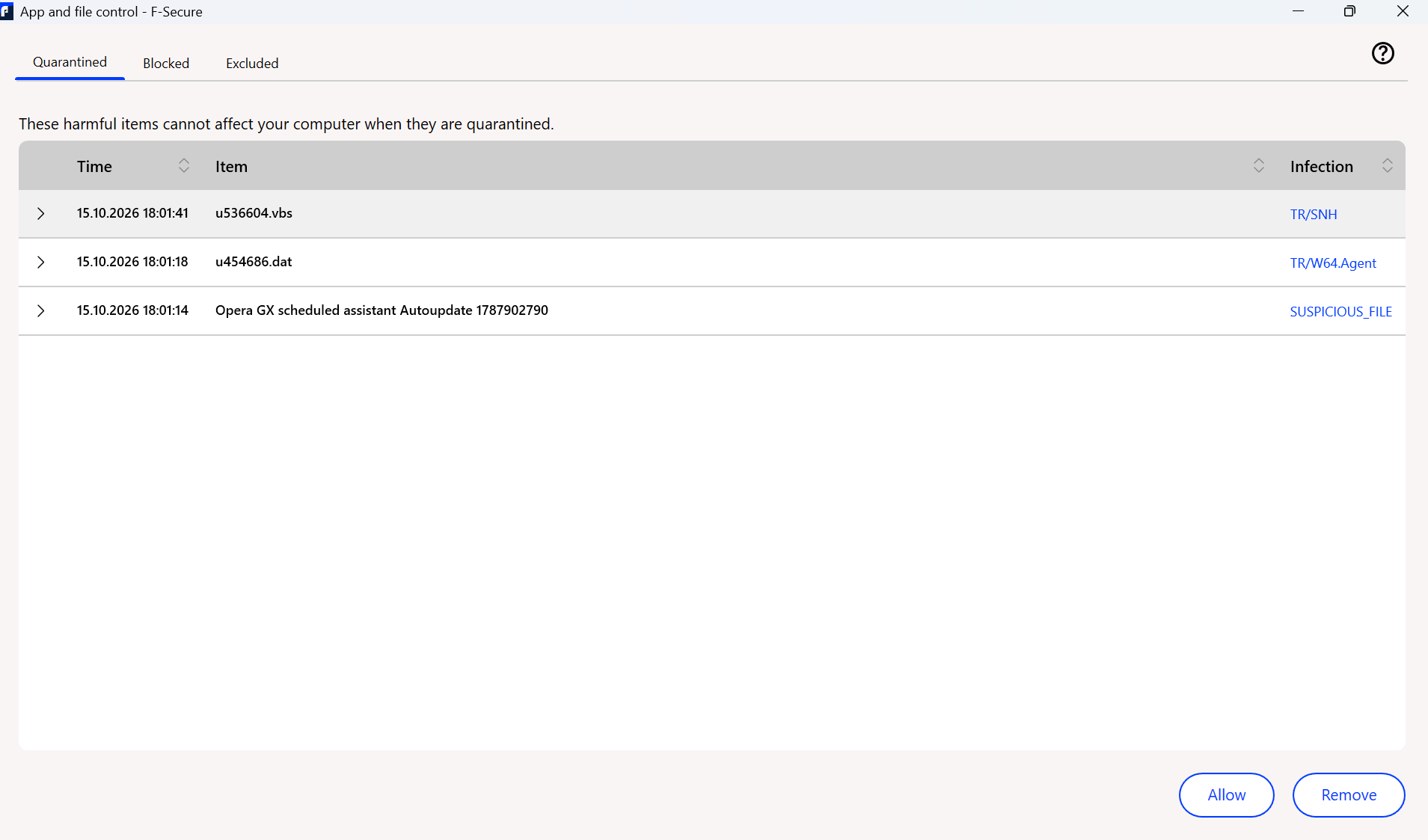
u536604.vbs and u454686.dat looks suspicious.
but without any context (like path) - it is almost impossible to say either it is a false positive detection or something dangerous.
as such - surely - .vbs file can be dangerous.
"Opera GX scheduled assistant Autoupdate 1787902790" is even more obscure without context.
When you wrote that "old laptop had trojan horse on it" ("old laptop is infected with Trojan horse virus") - did you mean these three detections as a source of this statement? Or there was a story with old laptop and its compromised state is based on that?
My question is how to proceed and how to be sure the transfer is safe?
Without repeating all the points above:
- if 'required files' are already on your USB flash drive.
- if it is unknown either USB flash drive is now 'dangerous' or only static suspicious files there (which are undetectable).
- if 'required files' are something like text files or sort of data and documents.
just connect USB flash drive to your new laptop (maybe without network connection), scan USB drive by F-Secure, transfer only required and likely 'safe' files to your laptop. Unplug USB flash drive. Scan files once more (placed in your laptop). Connect to Internet. Scan it again.
if files are 'publicly' available - you can try check it with some websites like VirusTotal. And / or by verifying their hash (SHA512 or something like this).
if 'required files' are some executables (.exe, .msi) or some potentially dangerous files (like modifications to other applications or sort of) - then - there are ways to 'safely' transfer them. But I am not sure that it is really possible to check if files are surely safe.
if important documents were received from third-parties - then maybe some tricky payload in them. Such as .pdf or Office files can be exploitable against some vulnerabilities in viewers/editors. Or just be with a payload.
Since you tried to contact the official support team, I think it is better to keep in touch with them. Maybe they do able to assist you remotely. Otherwise, a bit more information is required to a precise advice.
Thanks!
-
Hello, thank you for replying!
So it is just documents, photos and power point presentations along with some videos from my university. So nothing really dangerous about them I suppose.
The situation with the old laptop is :
Both RAV and Microsoft Defender is constantly giving alerts for virus threats for these two files ( in the photo above ). On display both of the antivirus software says it is Trojan Horse.
Laptop is 4 years old. Both new and old laptops are Lenovo with Windows 11 as operating system.
None of them have CD slots unfortunately.
Old one I connected to the internet few days ago when updating the AV software before that it was inactive.
I tried removing the virus with Safe mode and with the antivirus applications but it was not successful.
I contacted the team but seems they did not understand what I wrote because their reply was for me to check for fake threats or something similar..
Looking forward your reply!
Have a good evening!
-
Hello,
So it is just documents, photos and power point presentations along with some videos from my university. So nothing really dangerous about them I suppose.
In this case, if the files you need are already on the USB flash drive (from which F-Secure on your new laptop has already moved some items into quarantine), I suggest plugging in that drive, manually locating required files (documents, photos, PowerPoint presentations, videos), and copying them onto your new laptop's file system.
Just in case - scan them manually using F-Secure (and 'verify' that they are not replaced; such as - there are indeed documents, photos.. and not executables with look-a-like filenames/logos).
Risks are:
- in old terms, malicious things could inject a dangerous payload into all other items and files within a compromised system (such as "old laptop"). Modify them or do something else. In this way, "safe" things would also come to pose a threat per execution or accessing them.
- while browsing content of a USB flash drive - there are maybe still present some 'malicious' or 'dangerous' stuff from an old laptop, that were not (have not been) detected by F-Secure. Usually, just presence of such files does not necessarily mean that a problem will arise (for that to happen, they would need to be, for example, an exploit targeting a system vulnerability or some other weakness somewhere).
- if USB flash drive itself is now compromised in general. Utilizing, again 'in old terms', something like "autorun" or related mechanisms, where there would be no "safe" way to begin viewing the contents of a flash drive.
In my view, all three of the points mentioned above are unlikely in your situation. Or (with the second point) can be mitigated by proceeding with caution. Like perform only necessary job (manually transferring only the required files without any 'extra' actions around and avoiding access to potentially dangerous 'areas' of USB flash drive).
But I am not sure about possible additional information around and why F-Secure Support Agents definitely suggested to unplug and do not touch it at all.
Microsoft Defender is constantly giving alerts for virus threats for these two files ( in the photo above ). On display both of the antivirus software says it is Trojan Horse.
I think, I can't see that photo now. But if you were referring to the one from earlier (screenshot showing .vbs and .dat items in Quarantine), then sometimes it is a generic term and can be a false positive detection. But .vbs and .dat pair is a rather suspicious combo. And it likely points to something more within the system or surrounding it.
It's important to figure out where the file/item is located, or what is causing the notification about it to keep appearing. Why don't these solutions perform a cleanup or something like quarantining?
I tried removing the virus with Safe mode and with the antivirus applications but it was not successful.
Such as - did they fail to make it (like saying 'impossible to do', 'cannot' or sort of)? Or just did 'malicious item(s)' reappear then again and so notifications about them after supposedly removal process?
I contacted the team but seems they did not understand what I wrote because their reply was for me to check for fake threats or something similar..
well, maybe because this is a fairly popular one with FakeAVs and fake / deceptive notifications claiming that trouble(s) have been detected on your system. Typically, such notifications originate from the browser or some browser's addons. Can be from installed software as well.
But, yes, in your case that's not so (looks like?!).
// as a speculation: is it possible that all detected items in your old laptop are placed / detected in some sort of email software like Outlook or its archive? This could explain why notifications about them keep appearing and why there are difficulties with clearing them out. For example, these are 'stored' emails containing malicious attachments. If they are related to .dat or .vbs files, which F-Secure was able to move to quarantine from USB flash drive, then the situation is a bit unclear (because - probably it should not be so then). Still, that's a possibility. If so - the threat is rather static. And this is not the same thing as a complete compromise of the system on your old laptop.
In general, most of stuff like current TR-type malware and script-based one (.vbs) are likely require an active network connection to be real dangerous. Kind of 'first' step to your system. To get either command or further item; or transfer something from your system. OR just be manually executed/launched.
Otherwise, it would be something like ransomware (to encrypt your system) or completely old-fashioned ones (to wipe your system). So, more visible impact right away. Without any long-term 'threat'.
Without precise information on how all this started, what exactly is being detected, and so on, I would minimize the use of that old laptop while it has an active internet connection; in other words, I would isolate it. Because it is unknown what risks and consequences might arise. Especially if, for instance, it's somehow related to infostealers or any fileless stuff.
As for clean-up or fixing situation..
For example, Microsoft Defender likely includes an "Offline Scan" feature / option. You can try using this as an alternative to mentioned rescue disks / LiveCD/USBs.
It should be visible somewhere in Virus & Threat Protection - Scan Options within Microsoft Defender (Windows Security) UI.
I think tools like 'Kaspersky Rescue Disk' or 'Avira Rescue System' support installation onto a USB drive. And can be used as a bootable media with built-in scanners. But I don't know whether such actions are actually required in your case.
Maybe, enough to scan your system with some third-party tools / scanners as a second opinion. Such as: Emsisoft Emergency Kit; Kaspersky Virus Removal Tool or HitmanPro (I am not sure if it is still free to use; but looks like Sophos offer would allow to use it as a free trial). Or a bit more lightweight tools like: ESET Online Scanner; Trend Micro HouseCall; Or as I already suggested, even more light, F-Secure Online Scanner. Malwarebytes is also frequently recommended (though I would only try it if other tools haven't helped; or to check, in case you don't want to make any manual adjustments yourself). And I do not think I've ever tried current McAfee Malware Cleaner - I am not sure what it is capable of. But mentioned things are likely will cover all possible 'engines' and 'opinions' on your system safety.
And yet.. if the main concern is to get the files off the USB flash drive, then, well, just go ahead and do it. In general, F-Secure should even provide an option to scan a storage device when it is inserted into a laptop, before it is used. And if something (potentially dangerous) launches automatically when a USB flash drive is inserted, that has already happened the last time.
-
Hello, thank you very much for your response.
I have tried removing the virus via safe mode, since it showed me it was in temporary files. It was good for few days and then appeared again.
As for when I plugged in the USB flash drive… I plugged it in then auto play button appeared on the right but i clicked on the " x " so I guess it did not run? Then immediately went on to scan the USB drive.
Last 2 days F secure has not detected anything suspicious on the new laptop either, so I believe all is good?
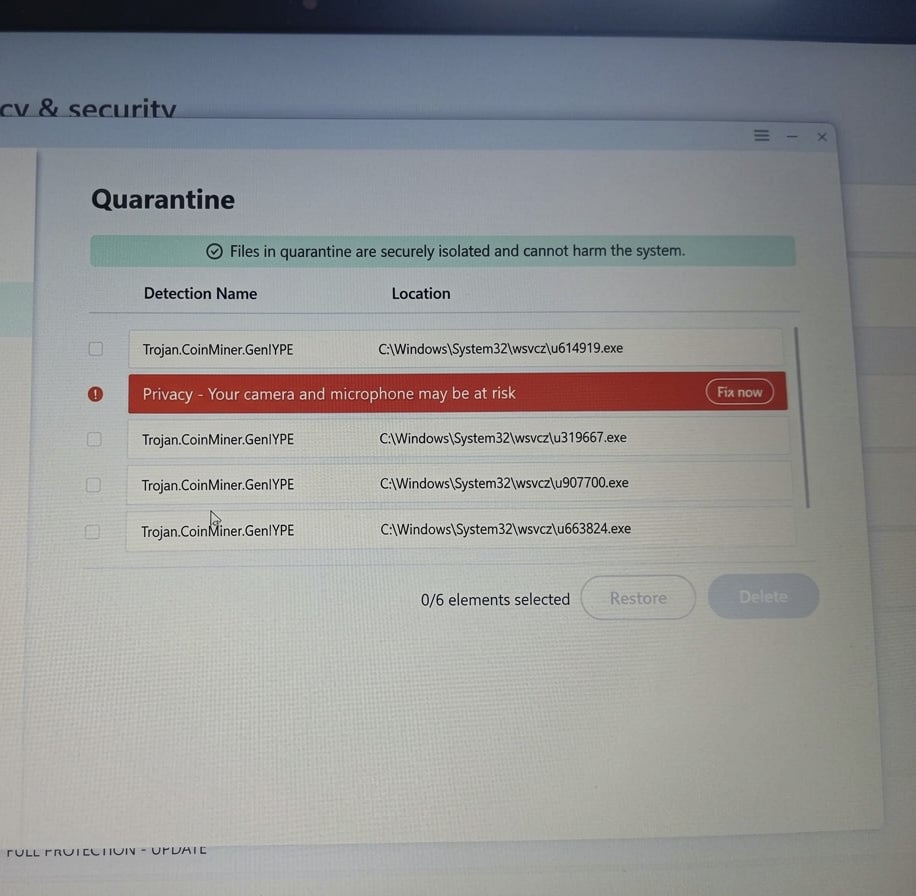
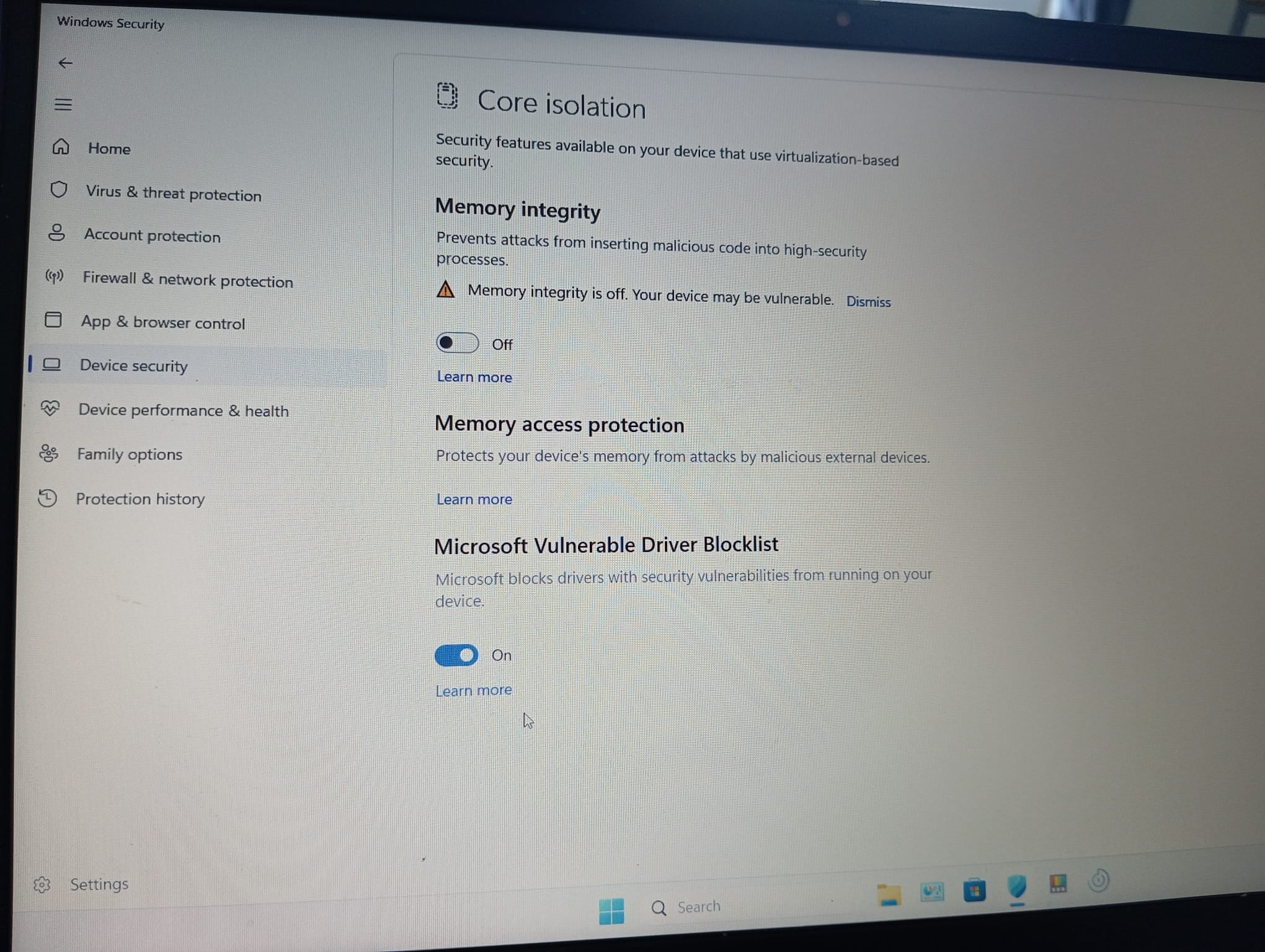
I will attach photos of the RAV on the old laptop showing the virus and also something strange with the device protection settings regarding the core isolation. It constantly turns off on its own when I turn it on. ( I turn it on today and next time I use the old laptop it is off without me doing anything ).
Thank you again for helping out!
Looking forward to hearing from you soon!
Have a good day!
-
PART ONE.
Sorry for the delay with my reply.
I have tried removing the virus via safe mode, since it showed me it was in temporary files. It was good for few days and then appeared again.
It could be due to visiting a (compromised) website, the presence of a tricky scheduled task in the system. Or something else entirely (like if certain software trying to update itself, but it is a hacked/compromised version).
OR some other trouble within system (the presence of additional malicious or unwanted items cannot be ruled out either; and being undetected / unknown for scanners / security solutions). Which will create them in temp locations.
Therefore, it is useful to determine (or try to understand) whether something common or something 'specific' occurred at the moment it reappeared.
Based on provided photo - well - there is definitely something suspicious with your old laptop. And situation is already unclear (how old laptop's system 'got' it; via installing something from the web; or just inserted tricky media like flash drive with a malicious paylod). But I will touch this at the end.
As for when I plugged in the USB flash drive… I plugged it in then auto play button appeared on the right but i clicked on the " x " so I guess it did not run? Then immediately went on to scan the USB drive.
It's generally unknown. What's more important, really, is whether there was any malicious item on the USB flash drive that might have automatically attempted to become active upon plugging-in (in any way).
But that is not particularly likely in your situation (I think). Because, in that case, this specific vector should have become the target. And if you simply copied files over from an old laptop, any "harmful" stuff are most likely stored in a 'static' state; they pose little danger unless you manually execute or access them.
I mean, more likely, situation is about something generic and 'light' rather than something highly specialized or multi-vectored.
But if to suspect that your USB flash drive has become a source of a malicious payload after being connected to an old laptop (for example, if the USB drive's icon in the system has been replaced by a shortcut pointing to a malicious script or executable file; because this is how usb's viruses/shortcut-type works), then just try to double check that your new laptop without tricky named folders in System32 (as per further discussion). Probably your actions were a mitigation against impact. But better do not repeat inserting USB into your old laptop for now.
Last 2 days F secure has not detected anything suspicious on the new laptop either, so I believe all is good?
It's always a bit "risky". But I think so, yes. Because if the only sign of a threat on a new laptop was the detection of two (or three) items during a manual scan, then no significant compromise of the system had actually taken place. These were some "dangerous" files (in terms of running or opening them) that had been copied from one file system to another.
However, in general terms, if two laptops are connected to the same network and one of them is infected with a particularly dangerous type of malicious stuff, it could pose a threat to all other devices on that network. And this depends on the specific configuration of both the individual device (the laptop) and the network as a whole.
But based on the description, it seems that only the old laptop has some sort of trouble for now, the extent of which is unknown, and these are likely limited to that specific device only.
and also something strange with the device protection settings regarding the core isolation. It constantly turns off on its own when I turn it on. ( I turn it on today and next time I use the old laptop it is off without me doing anything ).
For a device running Windows 11, this is indeed strange.
However, the "Core Isolation" (Memory Integrity) feature - I think - relies quite heavily on compatibility with other components and may sometimes require specific configuration adjustments.
For example, older devices may be incompatible due to specific graphics card drivers. Or, it is sometimes necessary to enable a particular thing within the device configuration.
Windows might automatically disable this feature (after an attempt to enable it) to avoid conflicts. However, I think that if this is due to an incompatibility, the UI should inform you and specify exactly what is incompatible.
Perhaps there is some information about the causes in the Windows "Event Viewer". I am not sure. Third-party drivers could very well be the reason for this (I am not sure if Windows 11 silently disables Memory Integrity or provides list of them).
I am also not sure of the best way to investigate why this is happening or how to fix it. I would suggest making sure that Windows 11 has all the latest updates installed, and also checking whether hardware virtualization is enabled (which is required for Memory Integrity) and stuff like TPM 2.0 in use (which is likely should be with Windows 11).
There is a random Microsoft Learn / Q&A topic with some general advices about checking thing around; And this is an official 'documentation' article about: https://support.microsoft.com/en-us/windows/security/windows-security/device-security-in-the-windows-security-app#bkmk_coreisolation with some explanations of its design.
// I will split my reply to avoid limitations.
end of part one.
-
PART TWO.
on the old laptop showing the virus
So, as for now:
their detection name says: "Trojan.CoinMiner.Gen*" about executables (.exe);
F-Secure detection name was "TR/SNH" and "TR/W64.Agent" about obfuscated item or scripts (.dat and .vbs). But with 'related' filenames;
Its view looks rather suspicious and points to some real impact indeed.
now, "C:\Windows\System32\wsvcz" by Googling it says that it is rather 'famous' one.
- some topics / discussions about this type of symptoms and exact these path/filenames;
- claimed to be 'associated with a malicious XMRig crypto-mining Trojan that often spreads via infected USB flash drives'.
Good sides of situation (potentially): threat is like unauthorized cryptocurrency mining; if something secretly uses laptop's CPU / GPU power to mine for a threat actor (not for you). And the 'trojan' part there is a cover (for example, perhaps, downloaded tricky software from untrusted source; or just 'compromised' good tool or utility; or with installation of some unwanted/bundled software by installing something safe). Can be even via USB flash drive with some malicious payload on it (if you do use it often and from different sources or across many devices); such as .vbs/.dat files were part of it then (as an attempt to spread over).
This can be considered as good sides, because everything is limited to your old laptop, and the only tangible consequence is increased power consumption (electricity usage) and so on.
Not nice sides of situation: it is unlikely that the trouble is limited to cryptomining. And, then, description of this exact 'symptoms' is about rather nasty stuff (to clean up).
Another thing is potentially acting as a shortcut/dropper virus that replicates across connected flash drives. In a sense, this aligns with your experience. Based on the steps you described, it is highly likely that you successfully protected your new laptop from harm. Had you opened the USB flash drive using File Explorer, the .vbs file (or something else) would likely have executed, potentially triggering malicious activity. Since you performed a manual scan without actually accessing the drive, like without clicking on the drive path in File Explorer, you almost certainly avoided any impact. But, perhaps, inserting any USB flash drive into old laptop may infect them now.
One source says this type of malware ""adds custom Windows services (can be hidden under groups like DcomLaunch) and hijacks Microsoft Defender settings by adding fake exclusions that regenerate if deleted"".
So, I would suggest looking into existing discussions on this topic. While they may not cover your specific situation entirely, they likely mention the same threat names and similar symptoms. You may find some useful insights and recommendations there regarding the next steps to take (other than 'complete' reformatting and so on).
- https://hackernoon.com/how-i-removed-a-rogue-u-service-hiding-in-dcomlaunch
- https://www.reddit.com/r/techsupport/comments/1nh1kw0/i_might_have_a_virus_on_my_pc_and_im_kinda_scared/
- https://www.reddit.com/r/computerviruses/comments/1mwj4sx/cwindowssystem32wsvczu805819exe_virus_reappears/
// an interesting thing is why "Opera GX scheduled assistant Autoupdate 1787902790" is detected as SUSPICIOUS_FILE;
Is it part of entire situation?
// about steps to clean up / fix your old laptop - I think - all the points from the previous replies are applied there. Either to scan system with multiple trusted free scanners and tools. Or with some kind of rescue disk / live system with some manual things to clean up. As well as to follow some advices from mentioned topics above (possible to do with Safe Mode boot; deleting certain things manually).
As for me: I would try to perform something like:
- scanning old laptop by previously mentioned tools and scanners (to see what can be cleaned by that way);
- manually remove (if not detected) mentioned folder in System32 path ('wsvcz') and its content;
- inspect Scheduled Tasks (via Windows 'Task Scheduler') and launched services (via running services.msc or Task Manager) against suspicious-named ones; And disable/remove them;
- 'isolate' any usb flash drives that were in use with old laptop. and if inserting - then manually (and carefully) - access them via safe way (tricky to say precisely how without having it);
- maybe to do some of mentioned things with "Safe Mode" boot. OR with RescueDisks, RescueSystems or LiveUSB/LiveCD or whatever way. To be with access to restricted areas otherwise. And already with some tools or automated ways to cure system.
since of mentioned relation to XMRig (if you do not use it on purpose) and since of tricky situation with USB flash drive (likely 'infected' at some point) - I think - situation is genuinely about unwanted or malicious stuff on your laptop.
Also, some generic discussions about it:
- https://www.reddit.com/r/antivirus/comments/1naic68/xmrig_crypto_mining_virus/
- https://www.reddit.com/r/computerviruses/comments/1oa0cl6/i_got_a_mining_virus_xmrig_miner/
matched your experience partially too. In the first one: it says that ESET Online Scanner was helpful tool. However, second one is about related to your story 'symptoms' and 'filenames/paths'.
Sorry for the lengthy comment. And sorry for any confusion or unclear wordings. My intention was to offer general guidance for your next steps, rather than providing a step-by-step set of instructions.
// and, again, I think it is rather safe to get 'required filed' from USB flash drive to your new laptop (unless you tried to use this USB flash drive again with the old laptop). Before accessing it - check how it marked in your Explorer. If it is not like something 'default' and usual - then better to use it via some safe methods (again - Safe Mode or booting from other media).
Thanks!
end of part two.
-
No problem at all! I am glad to receive such big help! Thank you very much for that!
I believe I can recall seeing RAV catching on the old laptop some kind of command in PowerShell defined and blocked as risky but I cannot find it right now to show you.
If it was not for university stuff I would have just reset everything and install new version of Windows and delete everything however there is no way for me to recover these things anymore rather than just get them from the old computer.
You think this command in PowerShell could be the cultprit as to why I am not successful in removing the virus?
Have a good evening!
-
You think this command in PowerShell could be the cultprit as to why I am not successful in removing the virus?
I do not think so.
First of all, I haven't yet read Hackernoon article provided above (which probably contains a detailed analysis of this or related sort of trouble). It may address how such a threat could have entered the system, how it managed to establish a presence, and how it could have spread.
Then, surely most of modern malicious or harmful things trying to utilize / exploit built-in system tools. So, utilizing PowerShell or Command Prompt (and so on) to make any 'changes' or 'modifications'. As well as downloading or executing actual payload.
Thus, the detected PowerShell command activity could have been either the initial vector of the problem or its impact. And anything in between.
So, if to think about your situation with old laptop like:
- "Trojan.CoinMiner.Gen*" as the main and only source / impact of compromised state;
- potential relation to XMRig (a cryptominer; opensource software), which itself is sounds as a safe one but frequently used by malicious actors.
- somehow additional payload of the way to 'infect' plugged USB flash drives (and so things).
I would speculate the situation looked something like this::
- you accidently downloaded or executed untrusted software or tool. maybe it was a risky software from the start; or maybe it was presumable safe one but downloaded from untrusted source; maybe it was a safe one and from trusted source, but bundled with some 'nasty' addition (as can be with adware, freeware).
- maybe it was misleading advert or banner or whatever else. so, you tried to follow and got unexpected payload. especially if to think that "suspicious_file" of Opera GX autoupdate in F-Secure quarantine is somehow related to entire story.
- or you inserted some USB drive which was infected by this type of 'malware/threat'. And so it spread to your old laptop; by running something from there (automatically or by manually clicking something).
I do not know where to find a good description of these things (with a better 'explanation' than mine), but something like random quotes from the web:
A USB shortcut/dropper virus is a type of malware (usually a combination of a Trojan and a worm) that infects external storage devices like flash drives, SD cards, and external hard disks.
Instead of deleting your data, it hides your original files and replaces them with fake shortcuts (.lnk files) that look exactly like your original folders.
When an infected USB is plugged into a computer (or a clean USB is plugged into an infected computer), sometimes the malware changes the attributes of your files to "Hidden" and "System," making them invisible to Windows Explorer.
It then creates small shortcut files carrying the exact names and icons of your original folders.
The shortcut acts as a dropper or launcher. When you double-click the shortcut thinking you are opening your folder, it runs a malicious script (like a .vbs, .bat, or .exe file) hidden elsewhere on the drive
This execution instantly installs the malware onto the host computer, which will then silently infect every new USB drive plugged into that PC moving forward
So, this vector could be your initial problem. For example, this is how an old laptop got infected. And now it is also a way to infect any inserted USB drives (and if they are then inserted into a new laptop, this could pose a risk).
Currently, I think your discussed USB flash drive is cured by F-Secure quarantined action. Or partially mitigated. And if you have not used it again with your old laptop, then it is safe to use with your new laptop too. However, the USB flash drive itself may still have some "oddities" or dangers in it.
If this is the case, try checking if the USB flash drive contains any unexpected .lnk or autorun.inf files. Better to delete them and never run / open.
as a sidenote: some generic and random article by Acronis (about USB viruses). some good points are mentioned there as a general information.
Anyway, why it is difficult to get rid of this virus/threat? It is most likely because it is some kind of common kit (since, as mentioned in previous comments, the folder and file names used and the general appearance of the situation are not unique) - it contains a number of ways to remain in the system and is what is called "developed". That is, a certain set of components rather than a single object.
If it was not for university stuff I would have just reset everything and install new version of Windows and delete everything however there is no way for me to recover these things anymore rather than just get them from the old computer.
Overall, I think that if you boot an old laptop into Safe Mode, it is pretty safe to use a (clean) USB stick or other media in that mode (Standard Safe Mode).
But it can be more dangerous if the inserted flash drive is "infected" with what is called USB shortcut virus / malware from the host (I mean, if your old laptop as a host CAN infect the inserted drives). It is still possible to avoid impact by not 'launching' / 'opening' impacted drive… but require more careful steps and looking.
That's why I would rather recommend create anything like liveUSB (it can be something like Debian or Knoppix live systems; Puppy Linux or whatever else capable to act as a live bootable media from USB drive). Then boot your old laptop with that 'liveUSB' - so - your old laptop's filesystem can be access a bit more safely and directly. Then, copy anything you want / need (and what is safe).
or to use, again, usb-based Kaspersky Rescue Disk or Avira Rescue System. That's way - there is also way to scan your system against malicious items. Both companies has guides and instructions on their websites.
// I tried to search a bit more. And sounds that this research article is about your 'type of malware': https://asec.ahnlab.com/en/91415/ (CoinMiner Malware Being Continuously Distributed via USB)
as you can see, there are quite many steps done and things exist that need to be checked.
Again, these are all relatively old notes, so the situation may vary in specific situations.
But combining all 'information' and working manually and with mentioned tools in other comments - it is possible to cure your old laptop.
Or maybe it is better to concetrate on a safe way to backup/get your important data. And reset your old laptop's system.
By the way, if we assume old laptop's system does not have any other problems (keyloggers or any other means of stealing credentials), it might make sense to use a cloud provider as a medium. For example, put everything you need in an archive (with a password) and upload it to the cloud (on your choice) on the old laptop. Then retrieve it from the cloud on the new laptop. I don't think that's possible at this point that the old laptop contains anything that could compromise existing safe files and this method of transferring them.
Thanks!
-
Online cloud services do not have auto scanning function for malware, do they?
So if I transfer the files there and download would be even more risky that way?
And what would you advice me to do with the files in quarantine for now in F secure?
Leave them be there so that I can have information on the viruses or press on remove?
Thank you for your reply!
-
So,
Online cloud services do not have auto scanning function for malware, do they?
Some of them do. I would assume that most of them do (already).
Even some smaller services (by which I mean those other than the most well-known ones) that are designed simply for file transfers offer this feature. For example, www.filemail.com (Norwegian a kind of file sharing service).
So if I transfer the files there and download would be even more risky that way?
Probably not. In some context - cyber security solutions like F-Secure may trust such files even less and with a greater caution (because the marker of Internet; indicating that the file was downloaded from the web and can be dangerous - more checks against them or less 'safety' points while analyzing them)
But it is important to note - I do not mean "uploading" absolutely everything, without exception, to the cloud.
My idea or suggestion was like 'uploading' only required items (from the old laptop) to cloud. Manually picking all required items and upload them (I mean - documents, photos, videos, some presentations or text files are less likely affected by discussed malicious activities).
And furthermore - my suggestion was about putting such files into archive (like .zip, .7z or .rar or whatever container) and password protect it. For example, to ensure that a "cloud service" cannot access them directly and, in any way, compromise their confidentiality.
I mean, there are plenty of 'trusted' cloud or file-sharing services with free tiers or / and without registration. If you upload encrypted/passsword-protected archive with your (safe) files inside - it is rather secure thing to do (in any sense). Then downloaded archive is unpacked on your new laptop. You can manually scan at any stage for sure.
Stuff like executables (.exe, .msi or any sort of them) or scripts (.vbs, .bat or whatever) are dangerous when executing them; or some rare cases with any file extensions of some sort of vulnerability / weakness somewhere to be exploitable zero-click or zero-action at all. If something are needed from old laptop within this scope - just try to keep it as 'static' as possible.
And what would you advice me to do with the files in quarantine for now in F secure?
Leave them be there so that I can have information on the viruses or press on remove?
They are 'safe' there. And your system are protected against them. Do not touch it at all (or you can indeed just 'delete' them from there; BUT not to restore or 'allow'. By delete - I mean - to use 'delete' aka 'remove' functionality which completely erase them from your system and quarantine without possibility to restore it).
The point is I am not sure .vbs and .dat were just some remains of 'malicious activities' or your USB flash drive was 'infected' by discussed 'shortcut' virus/malware. If so - it is still maybe there and F-Secure somehow did not react against it (but got its payload).
