
F-secure blocking Time Machine backup

Hello
when I a start a Time Machine backup on my Mac, it suddendly stops and a F-secure pop up indicates a potential treath with a data.
This is strange, because an previous analyse of my Mac with F-secure, it did not find any problem. The goal of Time Machine is only to backup files from the Mac on an extern drive, which is empty.
Any idea about the "problem"?
Thank you for your interest and your help.
Kind regards.
Answers
-
Hello,
There is a topic (without any solution) about related set-up and description: community.f-secure.com/en/discussion/129926/time-machine
F-secure pop up indicates a potential treath with a data.
do you see something like in the screenshot from mentioned topic (detection name for a 'file')?
or your experience is about some other wording like, maybe, blocking access to files/folders by F-Secure DeepGuard due 'a potential threat with a data".
anyway, it is still will be useful to know what is your macOS version and F-Secure version (Where can I find version information about the product?) currently.
Thanks!
-
Hi @Ukko
and thank you for your reply.
I do not encounter the same problem as the one you mention.
Here are the screenshots of the problem.
Time machine starts up to 24% percents and ths stops.
Then 2 popups (time machine and f-secure) appear at the same time.

and
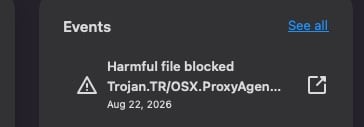
My MacOS Version : Tahoe 26.6.2
F-secure version : 26.6 (69077)
And as you can see, a manual scan does not find any harmful items (below).
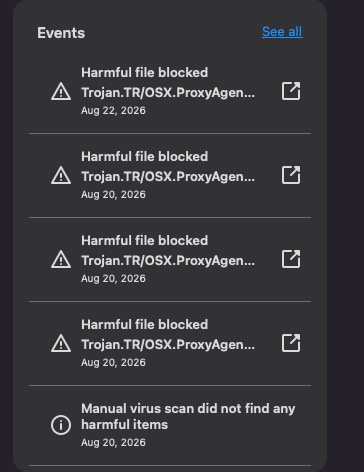
The Lacie backup disk is empty, and just backups the files of my Mac.
-
Thanks for your feedback and response.
First of all, I do not use macOS and I am not sure how things work there - so - my comments are mostly 'speculation' and likely of little use. But until responses arrive from more experienced users or official F-Secure team, they can help find at least some sense of the situation.
I do not encounter the same problem as the one you mention.
Looks like so, but still the main things are: Time Machine / external drive and certain detection as 'Harmful item blocked' during backup process (or at some point).
Can you check more information about this 'blocked file' with detection ""Trojan.TR/OSX.ProxyAgent_whateverelse_"" by using Viewing recent events for the product; Is a path or the name of a specific file or application visible here? Or will it be something more generic (like "system")?
Just to understand whether something specific and "known" is being blocked (somehow got picked up during the backup) as previously 'quarantined/blocked/deleted" item, some static file somewhere in system, Time Machine itself, or if the event is flagged in some other way (as system infection or so).
Probably, manual scanning might not detect a threat that is 'triggered' by backing up / moving it (like "accessing" item) and so detected by the real-time scanning or DeepGuard during back-up.
The process itself likely gets interrupted due to how Time Machine is designed (under such conditions).
Then it would be possible to explain different detection from the other topic (where it's something like Exploit.EXP/CVE-2017-118…). Because trying to Google this "CVE" - it is mostly about Microsoft Office files (as for CVE-2017-118***) or Windows platform as such. Still, such files can likely be found on a macOS computer.
You can also check if anything has been blocked by DeepGuard. Allowing applications that DeepGuard has blocked
In case, if after all thinking - there is no suspicion - not recommended but it is possible to try using 'exclusions' (Excluding files or folders from scanning) or temporarily disabling real-time scanning (Turning automatic scanning off temporarily) to check if Time Machine can make a progress. Such as to see if this 'break' is somehow related to Time Machine activity itself rather 'some item' being transferring to external drive as a trigger to detect this item.
Thanks!
-
Thank you for your help @Ukko .
The "recent events" on the following window were empty, wenn I clicked on the icone with the arrow.
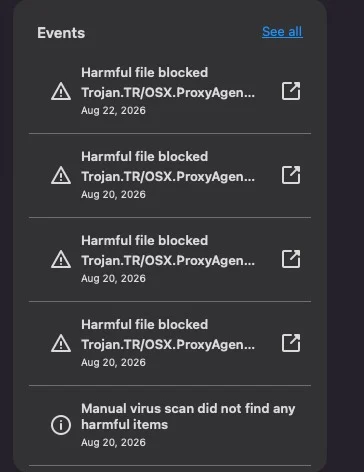
So, as F-secure did not seem to be reliable enough, I decided to uninstall it definively, even it is not the recommended way to unsinstall a security software.
And after that, I could perform the Timemachine backups without any problem.
So, we can close this discussion and I wish you a pleasant week-end.
-
Hi @1cedric1 - we at F-Secure would be interested in investigating this further. I understand you've uninstalled F-Secure but if you would be willing to work with us to resolve this problem we would be very grateful. Please DM me for details. Thank you!
Rasmus Sten
F-Secure Technology, Mac Team

