
Clarity

We must use a large number of services on-line, like the mail service Finnish Posti. When I tried to read my Omaposti, a prompt came up, requiring me to log in to this site, and asking for the password.
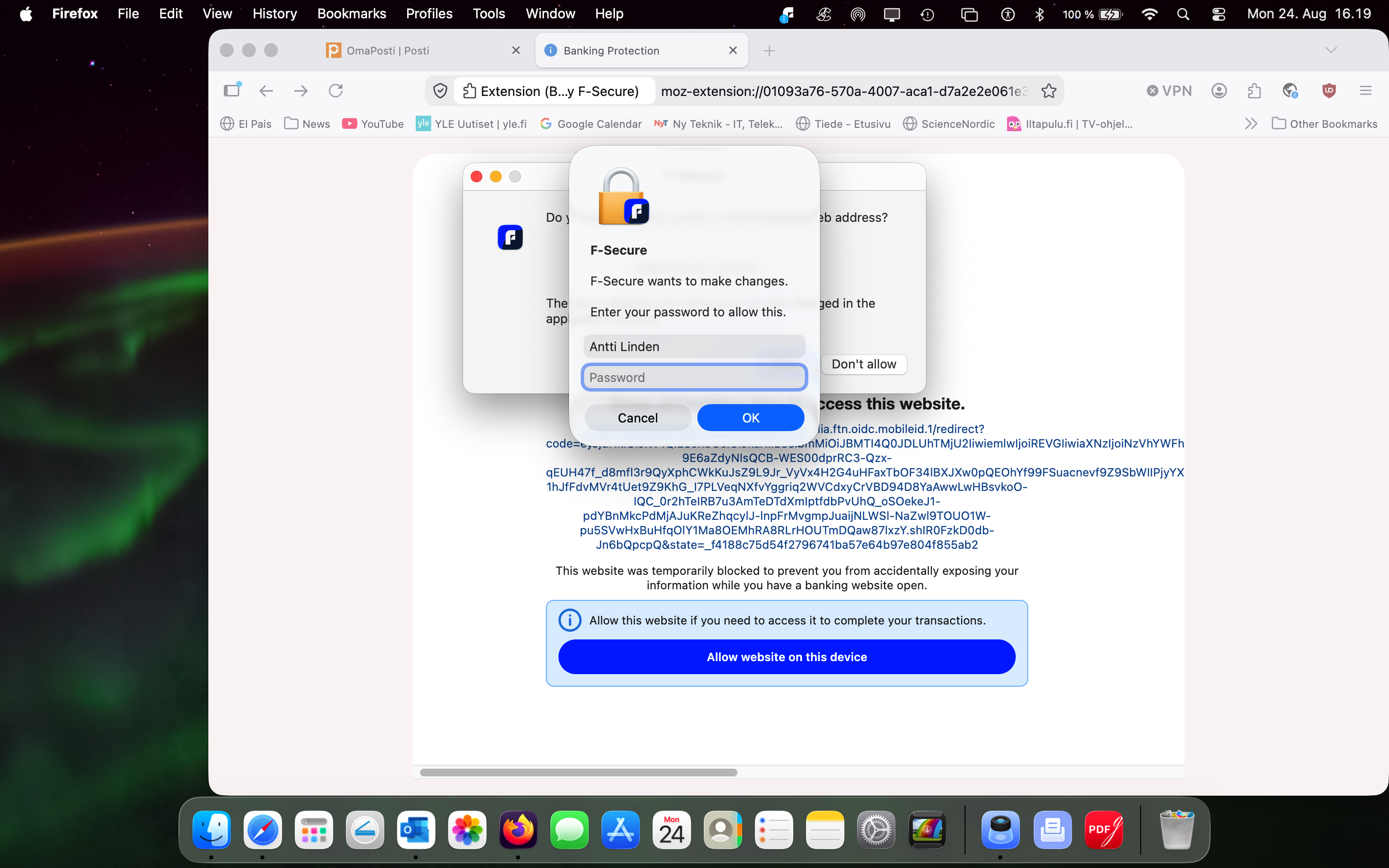
» But which password ??? I opened Lastpass on my mobile, and finally tried my mac pw - it worked!
> Why do you not tell, upfront, WHICH password you require ?? That would help being more clear, save time, and use security services, like yours. We do not need frustration - we need clarity.
Antti
Comments
-
Hello,
I think your described scenario is about this flow: Allowing blocked websites;
so requested password is your 'Admin' password (or userprofile's password with required rights) or sort of stuff. As you need administrative rights to change related settings in F-Secure app (to allow blocked website manually). The Windows platform equivalent is UAC request / prompt, so I would think that the 'prompt' shown in your screenshot is a system-wide mechanism that can be used in other situations and by other applications as well. Perhaps, there should be clarity on this if you use macOS regularly.
I'm not very familiar with macOS, but I assume the following happened: as shown in the screenshot, the open page was blocked due to an active banking session (F-Secure Banking Protection feature). It says so and button is "Allow website on this device"; then there is some additional prompt with allow(?) / don't allow buttons, which probably then triggered password prompt. Probably all prompts, blockpage, windows clearly explaining situation about current state / step.
It's unclear what triggered the banking protection session (since OmaPosti/Posti doesn't appear to be categorized as "banking" on my system). I also can't see if anything else is open, or what active banking protection actually looks like on macOS (on Windows, for instance, it shows up as a green frame around the screen). Also, blocked website/webpage domain is not visible - so, I am not sure the reason of not be 'safe/whitelisted' during an active banking protection session.
a prompt came up, requiring me to log in to this site, and asking for the password.
Thus, if to think about this as per 'screenshot' state - then - a prompt was not about 'log in to this site'; rather 'this site' was blocked and F-Secure described it and suggested (if needed) the option to manually allow access if necessary; What requires to allow 'manual' changes, and it is at this stage that the password is requested (because Administrative rights are needed to authorize changes or whitelist website).
However, why F-Secure banking protection session was active and why visited website was not 'safe/allowed' during an active banking protection session is unclear.
Thanks!
// by the way, I am pretty sure that situation is as described above, but as a fun story: F-Secure Scam Scanner may interpret this as a 'tricky' situation. Such as:
The image shows a pop-up window requesting sensitive information (passsword) under the guise of a security measure, which is a common tactic used in phishing scams.
With Recommended actions:
— Do Not Provide Information (Avoid entering any sensitive information in response to such pop-ups);
— Close the Pop-Up (Close the pop-up window without interacting with it);
— Report the Incident (Report the phishing attempt to your IT department or the relevant authorities);
Why it's scam? reasoning:
— Urgency and Threat (The message implies that changes need to be made urgently, clearing a sense of urgency to prompt immediate action);
— Suspicious Domain (The Domain in the pop-up window does not match typical security domains, suggesting it is not legitimate).
— Urgency (Creating a sense of urgency to prompt immediate action without thinking);
— Impersonation (Impersonating a legitimate service to gain trust and extract sensitive information).
What to do if you are victim:
— Change Passwords (If you have entered any information, change your passwords immediately)
— Monitor Accounts (Keep a close eye on your financial and personal accounts for any unusual activity)
— Educate Yourself (Learn more about phishing scams to better protect yourself in the future)
But this part of my comment is just for 'fun.
Thanks!
