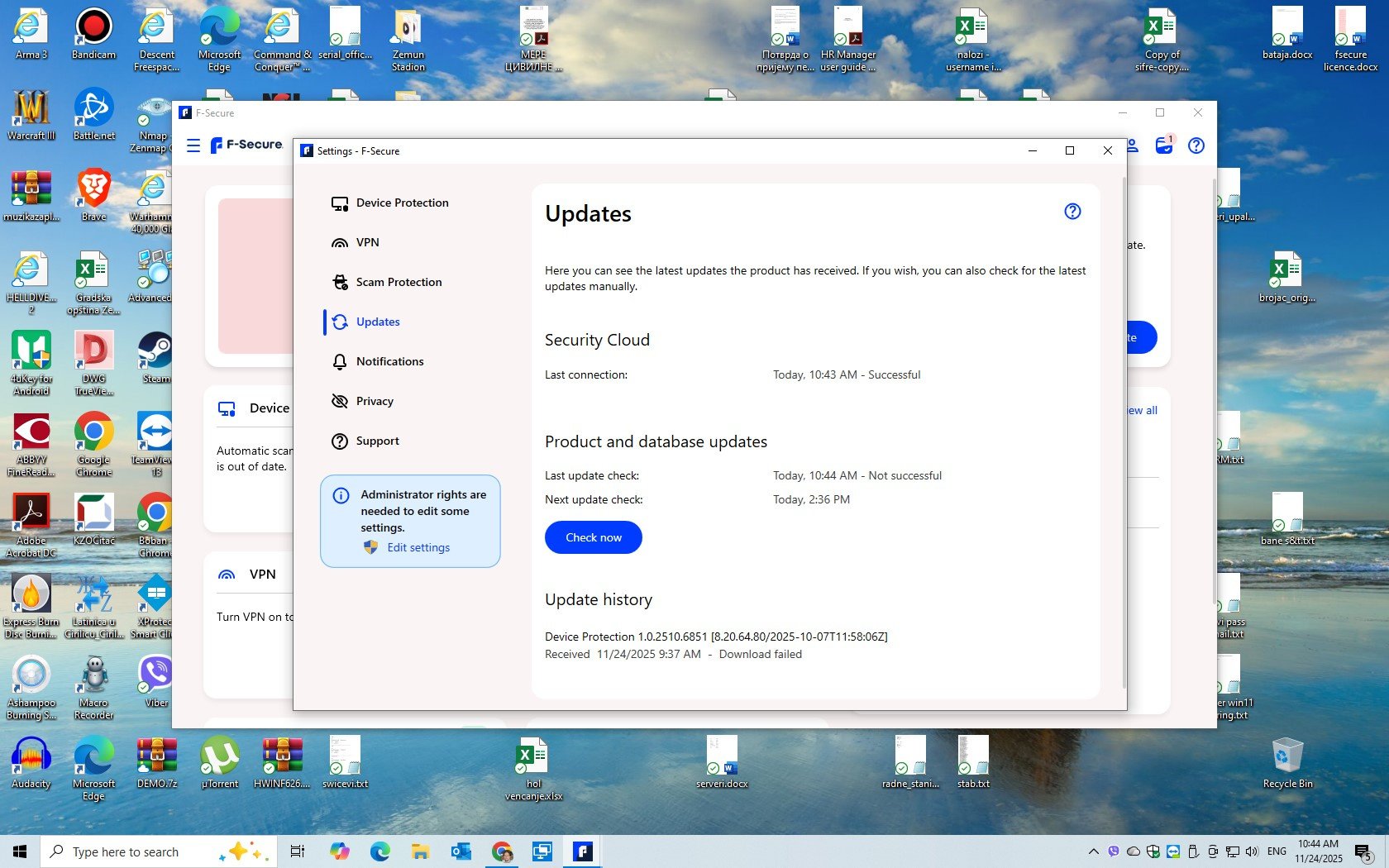
F Secure failed to update

Accepted Answer
-
Hello @BoskoM
Welcome to the F-Secure Community, and thank you for bringing this to our attention.
We have received similar reports regarding this issue. However, we are still in the process of gathering feedback from users. To assist you further and support our investigation, we will send you detailed instructions via private message.
Thank you once again, and we wish you a wonderful day.
Firmy
Community Manager | F-Secure Community
🔐 Strengthening digital security through knowledge and collaboration
🌐 Explore our User Guides | Knowledge Base for self-help resources
💻 Empower yourself with Cybersecurity Insights and protect what matters

Answers
-
It is always a good idea to include the device & software environment where the problem occurred in these notifications, at least:
- Win/Mac/Android/iOS version (supported environments)
- F-Secure version (latest recommended )
- Screenshots(if possible)…
The community portal could also be developed so that this information is always mandatory in opening the threads
-
Thank you,The issue you presented is known to dev. team as far as i know and in that case they are allready eagerly researching the root cause.If they need more information, you will receive a personal message with detail instructions.Othervise we have to wait at least the next release(25.6 ?) to solve this.Unfortunately, the consumer does not normally receive any reason code (info text) for that "failed" reason that would directly tell the possible reason for the failure.
-
win 10
as a random suggestions:
- can you try to restart / reboot system? I mean, perhaps, you may have tried to do this, but it seems like your system with quite a set-up and you may be keeping it "online" without properly shutting it down or rebooting it for long periods of time.
- can you try turning on F-Secure VPN and check if the update can be completed?
- optionally, try to consider whether some applications might be complicating the update process (network [over]load, proxy, simply some kind of system overload, or maybe the update process is somehow failing due to some third-party points, for example, I don’t know if it might react incorrectly to nmap activity and so on).
other than that - it would be useful to know how long you've had this trouble, whether you've tried reinstalling the product, other things around (as if it were a stable or 'temporarily' state, but it happens often) and so on.
Thanks!
-
-
i have the following message when trying to update the antivirus database:
F-Secure One Client
11.11.2025 waiting restart…
F-Secure One Client is usually about 'major' update/upgrade from one version to another (rather than AV database / engine / core). So, it looks like a certain update has not completed and you need to reboot your system to continue with it. Could you try to do it?
Although it might be strange if you haven't rebooted your system since 11.11.2025. Also, most often, such situations are resolved somehow 'automatically' (or per more 'visual' request), but something likely interfered with the installation or final stage of upgrading. Anyway, if rebooting the system doesn't help, can you try showing a screenshot of the situation.
// as well as some system specific details: what is your OS (Windows / macOS) and its version.
Thanks!
-
-
Hi,
For many years already now, shutting down computer does not reboot it. Windows has implemented a feature called hybrid sleep, where shutting down logs users out but hibernates the system. This means that system is resumed without restart when the computer is started again. In order to actually reboot the computer you need to select the reboot option instead of shut down.
Ville
F-Secure R&D, Desktop products
-
@madiccocom , thanks for your response and screenshot (and sorry for the delay with my reply).
as mentioned in the comment above: sometimes rebooting and turning off/on a computer (especially a laptop) can differ, because modern versions of Windows can have a so-called 'Fast Startup' option in power settings (I do, mostly, disable it via Control Panel: Hardware and sound — Power options — Power Button Actions — uncheck Fast Startup). Which (I don't know for sure, but I suspect so, since it describes a similar operating principle) is called above in the comment as hybrid sleep feature. Otherwise, shutdown is now always not equivalent to reboot.
Anyway, based on your screenshot:
- it has a bit of 'old' user interface;
- it may contains older Updates server (but likely is still 'fresh' enough);
- it contains older main core/engine (kind of things stuff);
The Ultralight-approach has now been replaced by the new technology design since F-Secure version *25.2 (released in March 2025), based on this What's New article. While your version could be something like 19.8 (released in November 2024).
So I don't quite know how to explain the situation exactly. It looks like you were still receiving updates to the old "infrastructure" until the very end.
Also, your listed "One Client" is 6.7.363 version which is not really old and not entirely the latest (but I can't check what is the latest stable one). Thus, I would consider that the reboot request / waiting restart should have already been many times/days/months (like if in September, October but for older One Client received updates).
And sounds that your installation is tried to upgrade from something like F-Secure 19.8 to the most current build like F-Secure 25.11 with replacement old approach to new approach. Which may in itself be a problem or a breaking point.
I also don't know how someone could get into such a setup. For example, leaving the laptop unused for a long time (many months), and then periodically turning it on and using it. And not receiving any kind of "update" notification or direct reboot request. And in general, how normal is the situation? Maybe if your laptop is ARM-based (processor), then if it is a faulty situation where reboot will not help - one of releases were 'unsupported' and maybe some stuck happens (but it is a fantasy-like thought).
Therefore, I would suggest the following: try rebooting the system. If that doesn't help, then if possible, and have a backup of things like Password Vault, reinstall F-Secure (if there's some kind of glitch). Or better to contact support or wait for more official answers in the Community.
Maybe @Ville can look at your screenshot and either confirm 'strange' set-up or suggest something better.
Thanks!
// Sorry for the unnecessary length.
-
-
-
I seem to be suffering from the same issue. I have 19.3. installed. If I manually re-download Total from the portal it says "Already installed"… is it really so that I have to uninstall the current version and then install the latest one? What is this - the 90's?
It was news to me at least that the major software versions do not automatically update at all…
-
First of all,your F-Secure version 19.3 was published February 2024 and after that e.g. Microsoft has published many major and minor updates(at least one in month) and some of them may brake or change structures of their OS and make platform apps unable or difficult to automatically updated ,exspecially security softwares are very sensitive of these..The latest version of F-secure(win platform) is 26.2(February 2026)
What you should do:
- Verify that you F-secure licence for your devices are valid(my.f-secure.com)
- If you are using Password Vault just in One device(not synced with any other ), export it as backup
- Reboot.Use unistall tool for your platform to remove old f-secure(this cleans up incompatible files)
https://www.f-secure.com/en/support/tools
4. Reboot. Check all windows updates.Install F-secure from portal.Now it should update it's version automatically afterwards,check release files…
Supported Platforms(Win,Mac,Android,iOS) and manuals
-
I work in IT, more precisely Software Development for over 20 years now. I am aware that the proposed solution is to re-install the software. I just don't see the point why that is required, instead of making sure all the upgrade paths are properly supported (or there is the option to run a manual update or re-installer instead of clearing everything).
In my exact case, I can see that 19.3. was updated on 12.4.2024, after that I have received updates to the components at least on 26.11.2024, 12.7.2025 and 9.2.2026 and then it stopped updating completely.
fs_oneclient_command.exe --productinfo
F-Secure 19.3 (5.4.1605.0)[ PRODUCT INFO ]
Product name : F-Secure
Product version : 19.3
Oneclient config : SAFE
MSI Version : 5.4.1605.0
Hotfixes : n/a
Install path : C:\Program Files (x86)\F-Secure\SAFE
Installation time : 2019-03-06T11:38:54Z
Language : en
Operator id : 6661000
Product id : 1188
Provisioning group : RTM[ LICENSE STATUS ]
License validity : valid
License expiration : 2026-11-29T00:00:00Z
Setup completed : yes[ UPDATE STATUS ]
GUTS2 server : https://guts2.f-sos.net
Last update : 2026-03-08T12:41:06Z
List of updates:
'F-Secure Oneclient 5.4.1605' - installed
'Capricorn Engine (64-bit) 2025-09-30_06' - installed
'Network Interception Framework Core (64-bit) 2025-07-14_01' - installed
'Ultralight Updater (64-bit) 2024-08-28_01' - installed
'Lynx Engine (64-bit) 2025-06-26_01' - installed
'Virgo Engine (64-bit) 2025-09-26_01' - installed
'Hydra Engine (64-bit) 2025-09-29_04' - installed
'DeepGuard Database 2025-09-26_01' - installed
'Universal System Scanner (64-bit) 2025-06-26_01' - installed
'Service Certificates (Windows) 2023-05-08_01' - installed
'Security Cloud Core (64-bit) 2025-06-12_01' - installed
'Ultralight Core (64-bit) 2025-08-14_02' - installed
'F-Secure NIF Web (x64) 1.0.419' - installed -
Well,i just introduced you probably the easiest method of recovering your issue.If you want more detailed ,experienced and "code oriented" answer you should contact directly to f-secure support .It´s also the fastest way..Normally consumers avoid too complicated answers.
btw. Normal reinstallation(via control panel) does not normally work,it needs using the uninstall tool
"
Thank you for the detailed diagnostic output. Based on the information provided, your installation is not failing to update entirely. Instead, it appears that the installation has continued to receive some engine and component updates, but the main product version has remained on 19.3 and has not transitioned to the current Windows release branch.
The latest Windows version of the F-Secure app is 26.2 (released in February 2026), and supported Windows platforms are Windows 11 and Windows 10 version 21H2 or newer.
This suggests that the issue is related to the major version upgrade path on this specific installation rather than to malware definition updates or license validity.
For installations that are several generations behind, the most reliable way to recover is to:
- make sure any local-only Password Vault data is backed up,
- uninstall the current F-Secure installation,
- reboot the device, and
- install the latest version from My F-Secure.
We understand the concern that this should ideally be handled more gracefully through an in-place upgrade path. Your feedback is valid, and we may pass it on internally."
-
Hello, I am also only an F-Secure user. Just a bit of discussion/suggestions.
In general, major software versions are updated automatically. I think that for over a decade (or more), no manual steps have been required to update or upgrade F-Secure solutions (at least, primary solutions like F-Secure SAFE / F-Secure IS / F-Secure Total app). Nor is it necessary to reboot a Windows device (with a few exceptions). I mean, If this does not happen, then some error occurred or there is some reason (problem).
If you mean that the existence of a "error" or "reason/trouble" there is not allowed, then... yes, that's probably true. This shouldn't happen. But it all depends on whether the developers can "recreate" the bug during testing OR whether one of the users encounters it and shares the information for investigation. Which doesn't always happen.
Such as: this 'old' topic in Community with official mentions like: """"we shut down the old servers that old versions were using. The app should update automatically but sometimes the old versions can't update because of some technical issue. You should have version 19.8 now. Anything older than 19.3 will probably no longer work.""""
About "running" the installer over an existing installation. The behavior you'd like (or are expecting here) to occur previously used to a certain point, but then changed. Without making things up, I can say that some sound explanations were given for this (which I don't remember exactly). Possibly to prevent unwanted behavior in borderline cases. But I wouldn't be surprised if there are some manual commands to run the installer to override this.
Although I think their installer is only the first step in delivering the necessary components. If there's already a "base" in the system and it's unable to obtain the necessary components, the installer can't do so as well (based on 'unknown' cause); And can't simply "change" the base to not broken one. But this is just a speculation.
Regarding the problem itself. It is unclear why your installation is stuck on a specific software version. Based on release notes: 19.3 was the latest before the soft switch to native 64-bit version in 19.4 (a quote: """The app is now provided as a native 64-bit version. First-time installations on 64-bit systems are now 64-bit. Current existing installations are enabled for 64-bit support during the upgrade, and the following (Total PC 19.5) upgrade migrates the product from 32-bit to 64-bit on 64-bit systems."""); 19.4 with some UI changes as well.
with 19.5: Windows 8.1 support is dropped (a quote: """Windows 8.1 is no longer supported As of version 19.5, the app cannot be installed on Windows 8.1, and versions 19.4 and older stop receiving upgrades on Windows 8.1. Microsoft stopped supporting Windows 8.1 on January 10th, 2023.""")
with 19.7: No More 32-bit Windows Support
with 25.2 (the version before that was 19.8): there is a fully new approach to design of protection core.
Also, there have been server updates during 2024 (I am not sure if it is possible that your installation kind of 'pinned' to old decommissioned servers for certain parts which may affect possibility to upgrade/update from version to version). I think your version/server specified is fine.
Most of the above probably shouldn't have affected your experience given other information. However, since quite a while has passed since the old core (like the one in your listing: Ultraligt and engines like Capricorn/Hydra) is no longer in use, it's possible this is causing some kind of glitch with the upgrade to the current version. I'd be interested to know: have you been using the device daily/often this entire time? Or were there significant pauses after 19.3 was installed (in April 2024!?) and say before March 2025?
thanks and sorry for my comment.