Bypass VPN for local services

Accepted Answer
-
@martink , so, I am not sure about directly "on desktop if you want to connect to an other PC in the same lan"; because I do not use it on my own - so I can't check or verify.
But general "Trusted Networks" is available for Windows installation (Connecting to other devices in the same network). UI says about printers, media players and streaming devices. I think 'other PC' can be part of it.
Furthermore, this feature seems to have the same purpose as in Android (where it can be a bit more advanced or tweaked).
If so - probably - this one is from 19.9 release's time;
// and, by the way, did you mean this one difficulty and situation: Unable to access a device in my local network with the host name when F-Secure VPN is on - this is old Freedome / F-Secure VPN guide. So, I am not sure if this is still a thing.

Answers
-
Hello,
// I think, your question is about Android or iOS platform?
Did you mean, then, this one functionality (Connecting to other devices in the same network)? Or is there some "Bypass VPN for local services" named?
iOS App Store app pages featuring a Version History (and so 'release notes' for previous versions); like this in What's New title. It is limited to provided information by developers, though. So, maybe good to look at stable app page as well.
But I am not sure about Android Play Store, where probably only notes for current version are visible. There may be third-party services or websites that scrap this information, then collect and track this data, presenting it as a version-by-version changelog. However, I can't recommend or suggest any; as I am not really Android user and I do not use iOS. And resources focused on these platforms are mostly unknown for me.
Also, initially I thought that it is like about Windows-based situation. If so, there are (currently) so called "VPN bypass - Websites" and "VPN bypass - Applications" options. The second one is a more recent addition.
"Trusted networks" option (as with a bit more connection with "bypass" for local services) was always there, I think. But constantly 'changing' under the hood due to infrastructure and other-related modifications. Beta release notes are within its 'topic' and stable one (sometimes more 'clear' or 'direct') within its 'what's new'
General changes for "Trusted Networks" feature and introducing "Wi-Fi protection" were last year (in May, maybe). I am not sure which version it was. Especially if there is some specific "Bypass VPN for local services" option/feature in place. And it maybe unrelated to mentioned points above.
Thanks!
-
I'm not sure as far as bypassing local services, other than the 2 settings as least on my Windows PC using Total, of App and Website bypass. It did mention in the Release notes regarding Website bypass, but I couldn't find anything regarding the date of App bypass in the release notes?
Version 25.10
Released November 2025
VPN websites bypass
Specific websites or domains can be
set to bypass VPN tunnel. This may be helpful in case some website
blocks access over VPN and user wants to avoid turning off VPN to access
such site. -
Thanks guys. That is not what I am after. My recollection is that it has been there for a long time.
What I am talking about is that on desktop if you want to connect to an other PC in the same lan you could not until you made some setting eg. in hosts. While VPN's from other supplier do not have that and you can get the access with a setting in the GUI.
Now to mee it seems that the same is available in F-Secure.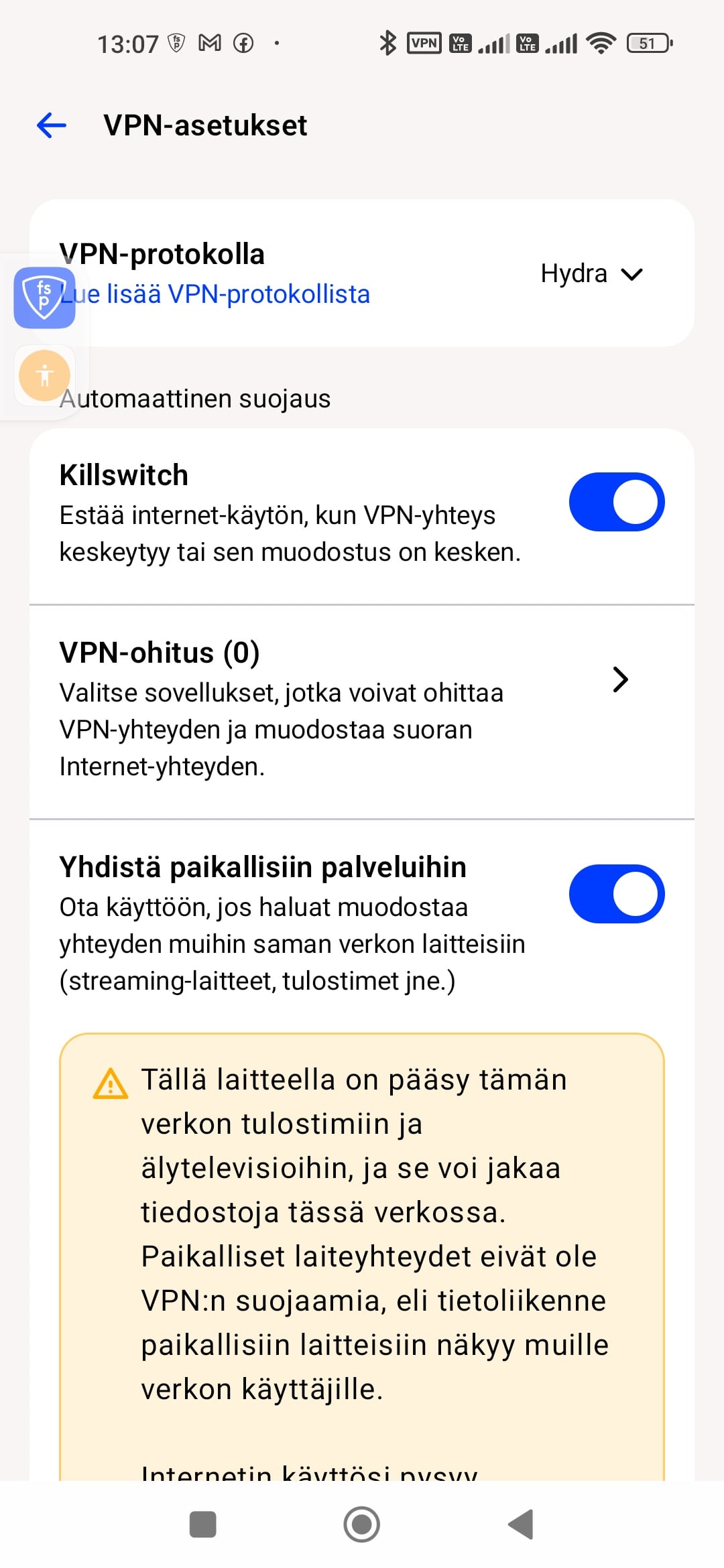
Though this is from Beta and Android. I was wondering if that is available also on desktop.
I should look for myself but I have not been able to install beta on my desktop. -
Thanks
I noticed the Bypass VPN for local services for the first time in beta 26.6. in Android.
I had not seen that in the desktop version in Windows.
Now I have the beta working in Windows and it is not there.
Only the Trusted Networks option is there.
I do not think those two options are not exactly the same.
For a desktop there might be less difference, but for a laptop you would have to add separately each WiFi where you want to connect to other devices. So you can connect to website without any extra steps, but not to your local devices.
The solution on a mobile device in Android is more to my liking, you do no have to set it for each WiFi you want to use.. Though I have not really used that as my mobile uses mobile data and there are no other devices in the same network as far as I understand. Or am I deadly mistaken.
Yes
Unable to access a device in my local network with the host name when F-Secure VPN is onis the even more cumbersome solution which made me use third party VPN where the local access is in the GUI.
My problem with the beta in Win 11 23H2 was solved with thisIn F-Secure security software for Windows, Software rendering is a troubleshooting feature used to fix graphical display issues within the user interface (such as a blank white/black screen or visual artifacts). It bypasses hardware acceleration by forcing the CPU to render the application interface. [1, 2, 3, 4]
-
Thank @martink and @Ukko for the clarifications.
After looking at this more closely, I think there is an important difference between the Windows Trusted Networks feature and Android's Bypass VPN for local services option.
On Windows, Trusted Networks appears to be network-specific. If I want to access local devices while VPN is enabled, I have to mark each Wi-Fi network separately as trusted.
For a desktop PC this may not be a major issue, because it normally stays on the same network. However, on a laptop this is less convenient. If I use the laptop at home, at another residence, at work, or on some other trusted network, I need to configure each network separately before local devices can be accessed while VPN is active.
The Android option, Bypass VPN for local services, seems to work differently. It appears to allow local network traffic to bypass the VPN without requiring every individual Wi-Fi network to be added separately.
If this understanding is correct, the two features are therefore not quite equivalent.
This raises a few questions for F-Secure:
- Is Bypass VPN for local services technically different from Trusted Networks, or are they based on the same underlying functionality?
- Why is the general Bypass VPN for local services option available on Android but not on Windows?
- Is there any plan to add a similar general local-network bypass option to the Windows version?
- If there are security reasons for keeping the Windows implementation network-specific, could F-Secure explain the design decision?
- In which Android version was Bypass VPN for local services first introduced, and where can users find complete version-by-version release notes for this kind of VPN functionality?
From a laptop user's perspective, having both options on Windows would seem useful:
- Trusted Networks for users who want the stricter, network-specific approach.
- Bypass VPN for local services for users who want local LAN access to work automatically while keeping Internet traffic inside the VPN tunnel.
This would also avoid having to use older workarounds involving host names, DNS settings or the hosts file just to access devices on the local network.
I think this would be a useful improvement particularly for laptop users who regularly move between several trusted local networks.
-
These options work differently. "Bypass VPN for local services" is easier to use and allows connection automatically to any service in local network. However, if you go to unsafe WiFi (like public WiFi) it will broadcast your traffic without VPN to local services, so your traffic leaks a bit. User should be vigilant and turn this feature off when they go to public network to avoid this.
Setting Trusted Networks explictly allows you to select which network is your home network and then it allows local traffic only to that network. It's a bit more complicated to set up but more secure. Once set up once, it will stay secure in all conditions.
The main reason for the difference is that mobile operating systems tightened the permissions and our app can't get a list of visible networks without extra (scary looking) permissions. This makes it impossible to show the "Select trusted networks" since we can't get a list of networks.
We are monitoring the feedback and considering the next steps.
Ville
F-Secure R&D, Desktop products
-
Thanks for your answer.
Well I see your reasoning, but my thinking is different
That is because I do not move my desktops from one Wifi to another that frequently so automatically connecting to local services works about the same as trusted nerworks.
With my mobile devices and laptops on the other hand I move frequently from within one Wifi to another. If I have automatically connecting to local services that means that every time I go away from my home to an area with Wifi there is a risk of my traffic being publicly broadcasted. The good side is that most WiFi do not allow connecting without login. However, if I have been there before and selected login automatically I am in trouble if I do not change the setting of the allowing connections to local networks without VPN. Therefor it were more simple for me if the mobile devices and laptops had the option for trusted networks. I do not go around and connect to any available network, so I do no have list all the available networks and thus listing too many optional networks in not a problem. Instead at a location I usually know before hand the newtork I want to connect to thus making it easy to make that trusted.
On the other hand the simplest solution for me were just to have the switch for allowing the local traffic on the desktop version of the software, too.