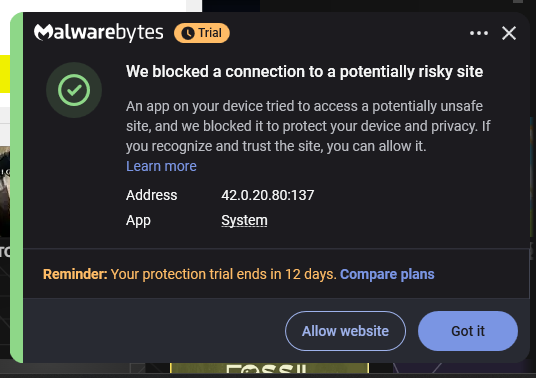
Could this be a malware/rootkit?

Malware that no scan can find – lsass.exe and conhost.exe connecting to multiple malicious servers
so basically ive had this problem for like 5 months. fsecure keeps blocking the same malicious websites every day even when im not even on my pc and no browser is open. these are the sites it blocks:
- beacons.gcp.gvt2.co (fake google server, real one is .com. IP is 42.0.20.80 in china on chinanet)
- cdn.discordapp.co (fake discord cdn, real one is .com)
- o293668.ingest.us (some data exfiltration server)
- i.ibb.co (real image hosting site but being abused for malware stuff)
- fw1.1225stco.yhu.ebox.ca (some sketchy subdomain)
i checked with tcpview and process monitor and the connections are coming from lsass.exe and conhost.exe. i tried to kill conhost.exe and my pc bluescreened instantly. same problem was on my old computer and now on this new one too.
ive scanned with literally everything and none of them found anything. zero detections:
- fsecure full scan
- malwarebytes full scan
- malwarebytes rootkit scan
- hitmanpro
- roguekiller
- rkill
- adwcleaner
- autoruns (checked everything, nothing suspicious)
so yeah ive tried everything. the only thing left is resetting windows with remove everything but i just wanna know what this is before i do that. is this a rootkit or fileless malware or what. and how did i even get it cuz i havent downloaded anything sketchy.
fsecure support said it might be my router but the connections are coming from system processes so its not just dns hijacking. also reported these domains to google safe browsing and alibaba cloud.
Comments
-
Hello,
Here are some things to consider based on your description:
- if they suspect something is wrong with the router, it's best to look into it;
- have you checked that conhost and lsass are legitimate executables (located in C:\Windows\System32\ and signed/looked properly)?
- any browser extensions/addons?
- is your version of Windows supported? Or not, and if so, which one?
- why on your screenshot - port in use is "137"? such as trying to communicate with a remote server/system using NetBIOS (perhaps), but I am not sure if this means probably being part of 'botnet' or something like compromised network application. Unless you are running some software or tools for something like home media server with certain connections to somewhere (which may be a reason for trouble).
Strange that nothing is detected by anything. Still, you can try a couple of other vendors or tools; And, maybe, some offline/rescueCD type of scanning.
-
Hi, I think my tcpview was just bugging because when i turn resolve addresses off it shows my own ip when its on it shows the weird domain and ips, And the conhost.exes etc are legitmate executables no extensions or addons in chrome and i have windows 11. and in procexp it changes the domain to 0.0.0.0 then the port.
-
Hello,
Sorry for the very late reply.
Sounds that if you do not use any media servers, file or printer sharing things / software / stuff, either on your local network or on a larger scale, it is best to take a closer look at the "security" side of this situation.
But if you do - it is simply how it works, or should work, and the "detections" are likely false positives.
I do not use them, so I am not really able to 'feel' it. But it can be anything (I think). Like built-in system feature or software like Samba. Or even some discovery or sort of features in p2p clients/software (like qbittorrent or whatever).
Still I am not sure why Support agents tried to guide you about something with Router.