Uninstall Problem

Hello!
Having made the hard decision to withdraw from the Beta Program, I now need some help! I've tried to uninstall the product, and I'm now getting the error message below:
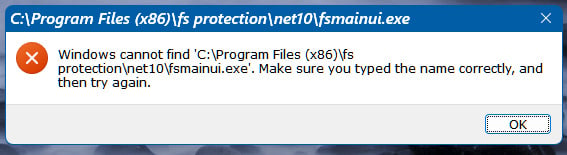
I used the usual Windows method initially, then ran the FS Uninstall Tool, but I'm still getting the above error. Also, the FS icon still remains on my Desktop. Can anyone advise?
Thanks,
Simon.
Answers
-
Hi @Simon
My first thought would be to try the uninstall tool from within Safe Mode. If you have Bitlocker enabled, you will need the encryption key to enter into safe mode or come out of it. I'm not sure pausing Bitlocker will help, I've always disabled it in the past, then re-enabled it after coming out of safe mode. You can verify it with a Google search. You could then manually search for hidden files (after using the uninstall tool), as F-Secure usually will leave a couple behind, like log files etc.
But, you have more experience with F-Secure than I do, so I don't blame you if you want to wait for a 2nd opinion as well, from another member.
I did ask Google AI, and it mentioned this as well, FWIW:
Step 3: Manual Residual Cleanup (If Step 2 errors out, running the uninstall tool)If the tool still tells you it cannot find the file path, you can manually strip the broken remnants out:
- Press Windows Key + R, type C:\Program Files (x86)\ and press Enter.
- Locate the fs protection folder visible in your error banner. Right-click it and Delete it completely.
- Open the Run box again (Windows Key + R), type regedit and hit Enter to open the Registry Editor.
- Navigate to the following path: HKEY_LOCAL_MACHINE\SOFTWARE\
- Look for an F-Secure or WithSecure folder. If found, right-click and delete it. (Note: Do not modify other folders in the registry).
-
Just interesting to discuss a bit:
but when / how did you see this 'error'?
right after system boot-up? or by trying to open desktop fs protection logo?
Strange thing for me is that mentioned path is about "Program Files (x86)".I thought all 'current' installations were migrated to native 64-bit and so "Program Files" folder since 19.4 beta 2. Some quotes that I am likely misinterpreting.
19.4 beta 1 (5.5.752):
Native 64-bit version is now available. In this beta any new installation on 64-bit Windows will install the natively 64-bit version of the product.
In next beta existing 32-bit installations on 64-bit system will be migrated to 64-bit version of the product.
19.4 beta 2
Automatic migration to native 64-bit version for all clients that are at least 19.4 beta 1 version.I thought maybe by keeping active installation on 32-bit system can be an explanation… but then how it was possible to receive enough updates/upgrades to be with .NET 10;
Anyway, it is a good thing that no unpleasant complications arose and a solution was found.
-
I saw the error message when I rebooted after uninstalling using the Windows uninstaller. I then downloaded the FS Uninstall Tool, and ran it, but it just said immediately that the product had been removed (or words to that effect), seemingly without actually doing anything. The last time I did this, the process took a couple of minutes.
I don't know about the system path. It was originally installed when the PC was on Windows 10, and I've since upgraded to Windows 11, but just as an upgrade, not a clean reinstall of Windows. Maybe that would explain the path anomaly? I've not reinstalled FS since upgrading from Windows 10 to Windows 11.
-
I don't know about the system path
fs protection originally was installed in "Program Files (x86)" as it was not fully 64-bit (as far as I can understand). so, that's normal.
Actually, I was just confused by the fact that it is installed / placed in "Program Files" on my Windows 10 system; and I assumed that happened automatically. But having double-checked now, it turns out I must have performed a "clean" install, because the first version was 25.9 (based on Recent Events list and installation date).
Thus, I suppose without reinstallation (if installed somewhere before 19.4) - "fs protection" folder should be located in the 'Program Files (x86)'.
// perhaps this is somehow related to the fact that the uninstallation process (even when performed as intended and recommended) left something behind in the system (a desktop logo). But it is strange that something attempted to open a UI upon system startup (to inform about something?).
-
Hi again @Simon
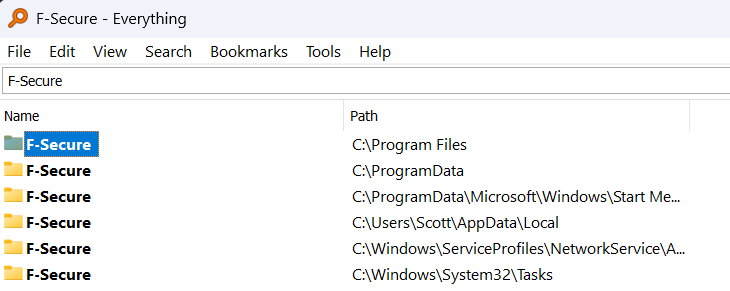
Glad it worked out for you. The hidden folders that are usually left behind even when using the uninstall tool, might still be in Program Data and AppData/Local as well as the other locations shown below.
-