Leaked info - from where?


Accepted Answer
-
Nowadays, while waiting agent-mode ai we can add present summary:
"
Beta Feedback: ID Monitoring – Password Not Revealable in Windows AppEnvironment
- Product: FS Protection (Beta)
- Version: 26.2 beta 3
- Platform: Windows 11
- Feature: ID Monitoring (built-in)
Observed Behavior
When a breach notification is received via email and viewed in the Windows app:
- The UI shows:
- Exposed email address
- “Password” listed under exposed information (three dots + underline)
- The “Password” element is not interactive
- There is no way within the Windows app to reveal the leaked password
- No contextual link to portal access is provided
However:
https://safeavenue-tp.sp.f-secure.com/iframe/-sso/fs_protection/?route=id-protection- The same breach entry allows:
- Viewing the exposed email
- Revealing the leaked password
Thus:
The data exists in backend and is viewable in portal
It is not exposed in the Windows app UIUX / Security Impact
The current implementation creates a functional dead-end:
- The user is warned that a password is leaked
- The UI strongly implies action is required
- No actionable information is provided in-app
- No guidance is given where to retrieve details
This leads to:
- User anxiety (novices)
- Frustration (advanced users)
- Reduced trust in alert quality
- Increased support load
From a security standpoint:
A password alert without the actual password (or a partial identifier) is operationally unusable for users with:
- Dozens or hundreds of unique credentials
- Random 16+ character passwords
- Proper password hygiene (no reuse)
Without identifying the specific password, the user cannot:
- Search their password manager
- Determine affected service
- Confirm if the password was already rotated
- Perform targeted remediation
Root Issue
There is a feature inconsistency between:
- Windows Beta App (ID Monitoring)
- Beta Portal (ID Protection view)
The app appears to:
- Display category metadata only
- Suppress credential reveal functionality
The portal:
- Provides full credential reveal capability
This inconsistency is not communicated to the user.
Recommended Fix (Two Acceptable Options)
Option A – Preferred
Enable password reveal directly inside the Windows app:
- Make the “Password” element interactive
- Use session unlock / re-auth if needed
- Match portal behavior
This ensures feature parity and removes friction.
Option B – Minimal Implementation
If reveal-in-app is intentionally restricted:
- Add a visible “View details in portal” link in:
- The Windows app breach view
- The alert email
- Direct link:
/iframe/-sso/fs_protection/?route=id-protection
This maintains security posture while restoring usability.
Additional Observation: Archived Breaches
Multiple breaches appeared archived (December 2025) despite the user not having prior access.
Likely explanation:
- App and portal share backend
- Archive state synced
- Possibly auto-archived by system logic
However, archive state without visibility history may confuse users.
Consider:
- Showing “Archived automatically” vs “Archived by you”
- Or timestamped action origin
Conclusion
The issue is not about breach detection accuracy.
It is about actionability.
An alert that does not allow identification of the compromised credential is operationally incomplete.
The portal already contains the necessary implementation — aligning the Windows app behavior (or linking to portal) would resolve the gap."

Answers
-
Hello @Toweri
I can provide basic information, others here may go more in depth. In the past, F-Secure used to show parts of the passwords that were leaked. That was an indicator on which ones I needed to change, besides reviewing them all for password strength. It no longer give us that information, which I find disappointing, as that was one of the features I liked about it.
Your email address has been exposed, but maybe not your client, I would change that password (if possible) using the password generator from within the F-Secure Vault. From within the Vault, I would also check the Password Analysis and review the Weak or Reused passwords and change those, especially and for financial etc. websites. For extra security, I would review all the websites in the Vault, as some of mine had changed how I logged in and wanted me to create a new account which I declined to do, and considered it a dead site (I no longer used, log into). I made sure all had a strong password and used 2FA wherever I could.
From a Perplexity search:
A combolist breach is a data exposure event where your email/username and password appear in a large compiled list that has been built from many different prior data breaches.
What a combolist is
- A combolist is a text file containing many username or email and password pairs (often in
email:passwordformat). - These credentials are usually aggregated from multiple independent breaches, phishing campaigns, and malware “stealer” logs into one large, cleaned list.
What “combolist breach” means for you
- Being in a combolist breach usually means your credentials were not stolen in a brand‑new hack, but were collected from one or more past breaches and bundled into a combo list now circulating among criminals.
- The main risk is credential stuffing: attackers automatically try those username/password pairs on many websites (banks, email, streaming, shopping) hoping you reused the same password.
How serious it is
- Even if the data is “old,” it is still dangerous if you reused that password anywhere or never changed it after the original breach.
- Large public combolists can contain hundreds of millions of unique email and password pairs and are widely traded and reused, so exposure can persist for years.
What to do if you’re in one
- Immediately change passwords for any accounts where you used the exposed password, starting with email, financial accounts, and key services (e.g., cloud storage).
- Enable multi‑factor authentication (MFA) everywhere possible and use unique, randomly generated passwords stored in a password manager to prevent future credential‑stuffing success.
Kind regards.
- A combolist is a text file containing many username or email and password pairs (often in
-
Hello,
Just a little bit of thoughts in addition to the answer above with very sufficient information (and, oh, I'm surprised, since it's a pity that there is no way to see part of the password or the whole one. Which is strange).
I take it, it does not refer to my email service itself…?
Well, I'm not entirely sure, but based on the name of "Combolist" (which could contain completely random stuff other than indicated in its name, and even completely bogus or fake data):
- logsmarket_otc (OTC Logs Market) sounds as a kind of place for obtain stealer logs. This raises the suspicion that the device may have been infected or compromised at some point.
- Privatedata_MARKET may also refer to some 'known' messenger channels, with the same purpose.
Probably in one of the posted (thrown in) portions - your email/password(?) were also included there. Although most likely there could be collected 'logs' from any source (compilations of other combolists with the addition of something "manually" collected), and not exclusively through the collection of data by some group of people.
So, if your email (or an account using that email) was previously leaked, that information could have been included for numbers (so, 'repeated'/'known' one). If not (or it doesn't matter), then it's possible these are logs (or/and credentials, browser cookies, or whatever) from one of your devices or devices where email was typed/used.
In general, infostealer type of malware is quite a thing for mobile devices too (Android-based, for example). So the vector could be anything.
Thus, if the email has not been somehow involved in other incidents (that you know of), then it may be worthwhile, as recommended in the answer above, to check/look at everything that may be connected to this email address and secure it as well.
// If your email address is easy to guess, it's probably just a random registration somewhere by someone who used it on some dubious website (or was simply added to a list). For example, I have a couple of such addresses.. and quite a few "leaks" (even though I have never registered anywhere with this email address).
sorry for spamming.
-
Hi users "TVC15" and "Ukko",
Thank you for your lenghty answers - however they did not answer my question.
As the message I shared indicates, my email and some password associated with that email address have been leaked. One or many times. The password is not shown on the notification message."TVC15", you suggested: "Immediately change passwords for any accounts where you used the exposed password". I ask you, 'Which password?' There is only shown three dots with an underline on that notification as an "exposed password"…
That doesn't really tell me much.The thing is, I have dozens - if not hundreds of logins with my email and a (randomized, mainly 16-character) password.
What I critisize with this notification is, that there is no way for me to know, which of those dozens (or hundreds) of accounts, where I have an account in with my email, are such where I'd need to change my password.
Therefore, this notification is worthless.
As it doesn't reveal - even to me, the owner of those credentials! - what particular password is leaked, it gives me no chance to search that password in my Password Manager to find out, on which web service I need to change the password on.
Or if the password is such that I had already changed on 2018…F-Secure should not send notifications to users, that does not explicitly tell, which password is leaked. It leaves the user with not feasible way to remedy the situation. It just creates anxiety to those who are not sure what they should do - and frustration to us, who would know.
No-one in their right mind would suggest that I changed passwords on each and every account, where I have an account with my email address, would they?
On the other hand, just the pair of my email and a password consisting of completely random characters, with no information where I may have used that particular password, is equally worthless to a potential hacker. They also have no idea, on which service that password is valid for.
To take advantage of it, they would have to blindly try it out on any web service they can think of.
Their chances of finding the right one is overwhelmingly depressing, considering the countermethods any modern web service will have against login flooding. -
Hi @Toweri
"TVC15", you suggested: "Immediately change passwords for any accounts where you used the exposed password". I ask you, 'Which password?' There is only shown three dots with an underline on that notification as an "exposed password"…
That doesn't really tell me much.
When I mentioned change that password, I meant for your email client if possible (your Google Gmail account etc).
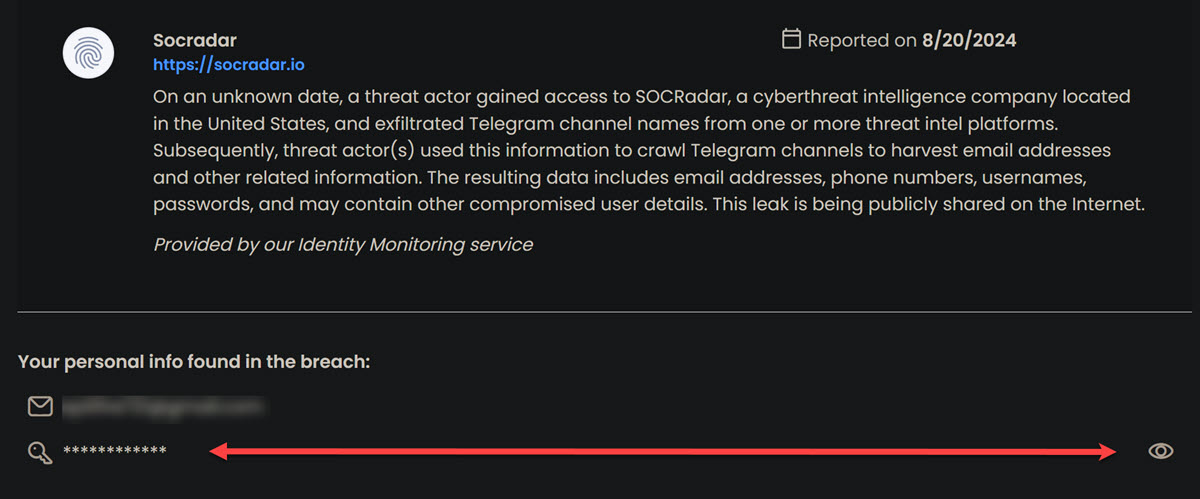
Like I mentioned, they used to give us the parts of the passwords that were compromised, making it easier to know which ones to change. I currently also use McAfee Total Protection with Identity Monitoring (example report below) and it has that option to view (eye icon) parts of the password that were compromised. When I want to review them, McAfee sends a email code for me to unlock the ability to view them/see them (just one time per session, not for every one), and maybe that's why F-Secure quit displaying them, for security reasons in case someone got on our devices and were able to see some of that information?
Since most of your passwords are secure, as you stated, then if you haven't changed the critical ones in a while, maybe do that, and also just go through them in general, not changing everything, just the weak ones, and reused ones?
It can be frustrating with the lack of information, as most of the reports are a combi list type of report (below image), and not so much for individual sites, where hopefully we get a notice from that site if it had been compromised, like Amazon, a mortgage company etc. I've seen this frustration on another AV forum as well regarding their Identity monitoring, but I'm not sure what else can be done in general?
There is the option to Contact support from the blue box in the Identity Monitoring window, and they could maybe explain it better from their end, of what they do and why.
-
Hello,
I just tried with Android 12 phone and beta F-Secure app (I am not sure if it's on up to stable version or a bit behind it). However, I couldn't figure out how to check the email address to see if it contained a recent leak. I mean, no one which I tried was recently related to a breach. All the "old" ones are still displayed with the option to view "all" the leaked data (such as username, password, and so on). Under the "Leaked information" section for chosen confirmed email address. Full and plain password.
Your view is a bit of 'privacy'-related, so to speak. It contains wording like "Other information that got exposed" and password-type is listed under this section. Maybe (as mentioned in other comments above) - now they have stopped showing the password for "fresh" leaks.
For example, it is possible to add any random 'username' and see huge list of breaches/leaks with such 'limited' view of only knowing that 'other information' is also vulnerable now. Because, basically, you cannot confirm 'username' (so, it is not secure to show additional data). And this is the case for old and fresh ones.
Why it is limited in your case - I don't know. Where you tried look at it (mobile, desktop)? Screenshot is about in-app view or is it part of email or something? Which platform?
Anyway,
As the message I shared indicates, my email and some password associated with that email address have been leaked. One or many times. The password is not shown on the notification message.
Just as a random point (and, if not all of 'notifications' are with this limited view): perhaps, password in that particular combolist is not listed in a 'plain text'. So, password is exposed. But listed/provided in hashed-view. So, the pair is something like: "emailAddress:SHA512hash". So, technically - both things are exposed.
But they either failed to provide it or did not provide on purpose there. Like if 'hashed' view is detected and skipped. For example, their system opted to think that it is not relevant to show. But this is if we look for some meaning in this situation and if the password is ever available for display to confirmed email addresses.
For example, looks like that phone number monitoring is only limited to show you that 'data' (and which type) is leaked in relation to monitored phone number. Not really its content.
What I critisize with this notification is, that there is no way for me to know, which of those dozens (or hundreds) of accounts, where I have an account in with my email, are such where I'd need to change my password.
F-Secure should not send notifications to users, that does not explicitly tell, which password is leaked.
Probably. But the point is that this is monitoring of the email address itself and its involvement in leaks. In general, the password may not be affected at all, but only the address or phone number in addition to the email address. Or just the email address. So, F-Secure sends notification to users whenever a monitored item is detected to be 'somewhere' publicly accessible (in malicious/dangerous context).
Why password (or part of it) is not possible to see in your situation - I do not know. But, can you try contact F-Secure via official Support channel and see if they can assist with accessing that information?
On the other hand, just the pair of my email and a password consisting of completely random characters, with no information where I may have used that particular password, is equally worthless to a potential hacker. They also have no idea, on which service that password is valid for.
It is possible that combolists are just a collection of old leaks. If not - they usually(?) come with some context from where stolen credentials are (if they were stolen and not leaked; if they were leaked, then they are part of that known leak).
If to look for some connection in the combolist name in your screenshot, it's possible the "leaked data" was obtained by something like malware. If so, then everything can be considered compromised (where this email was used to log in to a service or website).
If this email was previously known with some leaked password, then most likely it was added to this combo list.
-
Just as additional information:
I received a warning email from F-Secure informing about the leak, prompting me to check the app on my computer.
The leak information (screenshot I provided) is taken from 'fs protection' Beta app UI, "ID Monitoring" section on Windows 11.
The "Password" markings (three dots and an underline) are not clickable links.
Having such markings distinctly dislayed in the warning, yet providing no way to find out, what particular password has been leaked, is in no way heplful. Only worrying (for novices) or frustrating to more advanced users. -
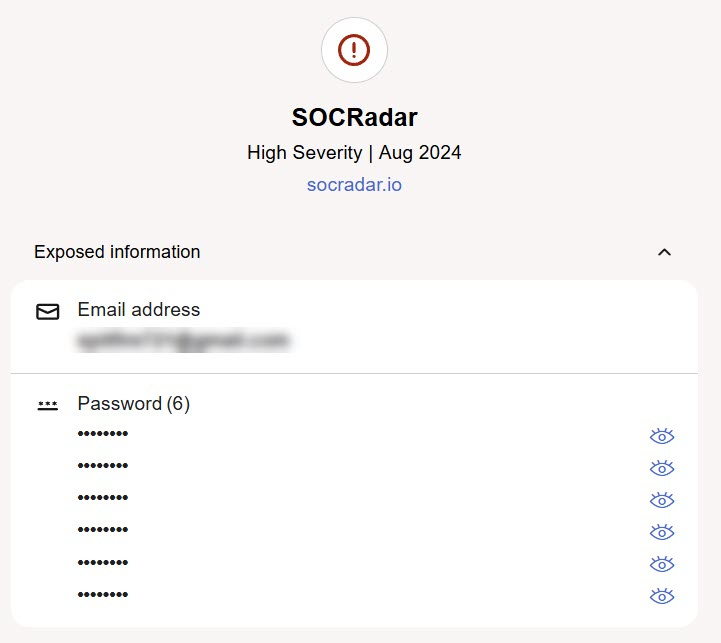
@Toweri I thought I had checked before I had previously posted, but have you checked the information in your F-Secure portal? It does show us the user names that were compromised, just not from within the app itself, maybe for security of our devices, where someone would have to know out portal credentials to see that information?
Again, apologies I didn't catch that previously, as I have multiple PC's with multiple AV's that I compare against each other, which I enjoy doing, and I lost track of that one.
-
-
The "Password" markings (three dots and an underline) are not clickable links.
It just acts as a logo here. To distinguish a section (such as, Exposed information: this, this and this; Where each category with its own 'logo' and 'title').
As shown in @TVC15 latest screenshot, "actual" password(s) are listed under the 'title' with the possibility to unhide them (logo in the right). Where both, "email address" and "password" (and maybe more 'categories'), are placed under "Exposed information".
In your screenshot, for whatever reason 'password' section is listed under "Other information that got exposed". As happened on my phone (Android 12, beta F-Secure app), in this situation, the data itself isn't shown, only the fact of other exposed information in terms of 'category'. For example, if the item being monitored is a phone number or username, then I can't see extra.
But with monitored (confirmed) email address - I can see all stuff (that is provided). However, I really did not find any email address with recent leaks (only old ones). So, I am not sure if 'fresh' ones are just arriving with this limited view.
Since you tried with recently introduced built-in/native design of ID Monitoring in fs protection Windows app (as I think) - maybe - that's the difference now. But I am not sure why.
It looks like my Beta account is not associated with F-Secure portal. I cannot log in with my Beta account.
yes, it should not be possible to do.
you can use beta portal (My FS Protection portal) for beta account. But..
but have you checked the information in your F-Secure portal?
I think this feature is absent in our beta version of the portal (if it is available in My F-Secure in the stable version).
// Even though the changes have been around for quite some time, I still haven't looked at ID Monitoring on the Windows platform. So, I don't know:
- if the password can no longer be viewed there for monitored confirmed email addresses, if it has been "leaked".
- or if this is something specific for your particular case.
-
Hi Ukko,
Thanks, that clarified quite a bit of the oddities I've encountered with this.
Could you please verify, if it should be possible to find the ID Monitoring information on the beta-portal?
Also could you please send me a link to the appropriate beta portal that I can log onto with my Beta account credentials (I am not at all certain, which is beta and which is for the release versions…)
Being able to check the beta portal / ID Monitoring, I can give you definitive description, what do I see there. That might help you pinpoint any account-specific errors (if any.) -
Hello, @Toweri
Sorry for my very late response. I somehow mishandled the fact that you responded.
Could you please verify, if it should be possible to find the ID Monitoring information on the beta-portal?
As I said in my previous comment, I think the beta version of the portal has been doing without this "part" for a long time now.
I think this happened when the 'original' standalone ID Monitoring (F-Secure ID Protection; well.. and I forgot what it was called in the beta) was discontinued and replaced with a built-in design/feature in the F-Secure TOTAL app. The current fs protection beta is the all-in-one solution as well.
So, I am not sure about stable portal (but based on comments by @TVC15 should be the case); but, at least, my beta portal without any extra spaces for either VPN or ID Monitoring or Password Vault things. And just, in general, being a bit more (quite more) outdated in comparison with a stable one.
Also could you please send me a link to the appropriate beta portal that I can log onto with my Beta account credentials (I am not at all certain, which is beta and which is for the release versions…)
In case this ever changes, I'll provide the entire routine.
- https://www.f-secure.com/en/fs-protection (this is current landing page for beta project).
- there is a button named "Access FS Protection" (it will be this URL: https://safeavenue-tp.sp.f-secure.com/iframe/-sso/fs_protection)
- resulted page would be fs protection portal login page; based on your location (? maybe; if there is some relation to regulations or more CDN-based approach; I don't know for sure) and some additional session things. For example, shortened to take less space is resulted page for me via Microsoft Edge (UK/GB). Here I then use my credentials to log in.
So, you can basically (if not sure about password) to use 'Forgot your password?' option.
Being able to check the beta portal / ID Monitoring, I can give you definitive description, what do I see there. That might help you pinpoint any account-specific errors (if any.)
I don't think there should be anything related to ID Monitoring there, but if so - I'd be happy to hear it (and interesting why I don't see it).
Sorry again for late reply. And thanks for your feedback!
// by the way, maybe you could also try as a workaround - create a trial account of the stable F-Secure (with some other email) and see if it will be possible to use ID Monitoring (and if so, then add a "topic" email address for monitoring and see the result)
Because based on Ville's answer in another thread, perhaps the password shouldn't be revealed there either, since the "current" (actual?) backend now(?) only stores password hashes, not the passwords themselves. Meanwhile, information from the old backend might still be accessible for viewing leaked data (then it explains why some passwords of some leaks' content are visible somewhere, which was the experience of me or TVC15 via different routes).
-
Hi @Ukko
Thank you for the detailed reply!
Yep, you're right. In the beta-portal there is nothing related to ID Monitoring.
See attached screenshot of what I do see there: Nothing else but the devices in use. This has been the case as long as I can remember… -
Thank you for the detailed reply!
Yep, you're right. In the beta-portal there is nothing related to ID Monitoring.
Hello, @Toweri and sorry for bothering with this old topic.
Today I had the opportunity to double-check everything more carefully and I found out that you can actually view information about leaks (for ID Monitoring) in the beta portal.
I was previously confused by fs protection emails mentioning the ability to log in and view 'more details' on the portal (but each time I couldn't access the portal due different reasons; and also just though maybe it is an old 'template' letter for previous design, because of its wording and stuff like that).
However, today I added one email address for monitoring and received a confirmation email; Emails containing information (URL) on how to log in and view details on the portal. I tried it and opened 'frame' was actually about ID Protection layout.
So, there is also unique access-code, but I think it is auto assigned per visit.
Thus, I think if you log in here (https://safeavenue-tp.sp.f-secure.com/iframe/-sso/fs_protection/?route=id-protection), you'll be taken to a page with the option to view information about leaks on the website/beta portal. Although I don't think the information available will be much different (although in my case, the app had a slightly more direct hint about the service).
Thanks!
-
Yes! That link takes me to a view where I can see the email address as well as the password leaked. This is exactly the information I was looking for, having received that alert email!
Now, if that link could only be added to the 'My FS Protection' main page, so that it could be benefited by everyone.
It should also be included in the alert email I originally received.Cheers!
-
Now, if that link could only be added to the 'My FS Protection' main page, so that it could be benefited by everyone.
I haven't used the stable version (My F-Secure) for a long time, and haven't tried to access the stable version portal for even longer, so I don't know how big a difference it is from the beta version (My FS Protection) now. Previously, the beta portal was stuck on a specific 'build', while the stable version changed slightly and with significant additions. I would assume that the stable solution's portal has all these features (as mentioned in this topic by TVC15) with easy access and probably the beta has such an "indirect" approach due to differences in the versions of current features and portal's implementation. However…
It should also be included in the alert email I originally received.
I think that's how it should be.
I have a feeling (but I don't have access to an example) that any email-letter about ID Protection (ID Monitoring) has a "button" or mention of the ability to access the portal (which is the URL provided). I always thought this might be a "mistake," since the wording/graphics were similar to ID Protection (instead of the built-in ID Monitoring); and like from discontinued features/solutions. But apparently it was better to try harder at the time. This particular example (my previous comment) appeared when I added an email for monitoring and needed to verify it (so, email letter contains this information; like 'way to do it' is included).
And I think that the built-in view in the application (in principle) should contain all the same information and completeness about leaks. At least, now.
Additionally, I noticed that 16 of the 17 listed leaks have been "archived on December 2025".
Archived by whom?
I have not had access to these alerts before today.
I think that if they were archived in the app (desktop/Android), that's probably why they have the same status in the portal. My feeling is that they're using the same backend, and the data is likely synced or something.
However, if you're talking about the fact that you haven't seen most of them (previously) in the app, that's surprising. I don't know why, especially if they're only shown in such large numbers and archived status in the web portal.
-
Uh.. I feel like I keep on repeating myself:
On the app (currently version 26.2 beta 3) I do see the warning we are discussing now.
However - I do not have any way to reveal the password that is indicated there on the UI and strongly suggested to be changed.
I can reveal the password at the portal via the web link you gave me.
That is currently the ONLY way for me to reveal the password.
I ask this information be delivered to the developers so that they can implement either:
a)
Get the "Password" item displayed on the Windows app - ID Monitoring section to actually reveal the associated password.
(Currently it is only a non-functioning graphical detail on the UI.)
or:
b)
include the link you provided, onto the app as well as the alert email, so that one can enter the portal and reveal the password there.
This is my suggestion as a beta tester. -
On the app (currently version 26.2 beta 3) I do see the warning we are discussing now. However - I do not have any way to reveal the password that is indicated there on the UI and strongly suggested to be changed.
I do not think you keep on repeating yourself. And it is good that you described the current situation (which "has not changed" since the beginning of the topic).
Because I could imagine that some changes might have occurred within the application after all this time (since the current form of ID Monitoring is, in fact, the most recent feature and is constantly being improved / tested). For example, in my situation, I did not find any differences; and even on the contrary, the "information" in the application was in some ways even more complete.
I can reveal the password at the portal via the web link you gave me. That is currently the ONLY way for me to reveal the password.
Glad it helped.
fs protection team suggested the reasons why the password is not displayed in the app in another thread (in the Beta section of community).
But as I understand it and their suggestion/explanation, in that case, the portal should not be displaying "password" as a password too.
Since I have not had the opportunity to check everything thoroughly, it is difficult for me to say anything. My experience has either been leaks without a leaked password or the password is displayed in the app. Your situation is likely unique in some way or unusual one. But since a 'related' experience was confirmed by TVC15, it is likely that the portal has some priority in its ability to display the "password".
My thought was that the leaked password in the informed leak was not a password per se, but a hash. Such as, an 'email address' + 'password hash' pair (for example) + some salt/pepper. Or listed as such. In this situation, the leaked password is not really known (and you do not monitor the password itself; in case if 'hashes' are matched). This is not always helpful for the fraudsters either, since they need to crack the hash to find out the password.
Accordingly, if an email address is being monitored (and it was leaked along with, say, a hash of an unknown password), only the email address would be shown, and the password would possibly be skipped (since it is "unknown").
As I recall, about the same explanation was given in another thread (quote: ""If the password has been leaked in plaintext, then we have it in plaintext and can display it in UI. If the password has been leaked in encrypted format, then we can't show it"").
I ask this information be delivered to the developers so that they can implement either:
I would suggest to create a bug report either via beta@f-secure.com or via email address from "Found a bug?" sign/routine in the main UI.
Such as: app has not information / does not show the password, webportal does. about certain leak or 'all' of them.
So, just to know, either the portal is malfunctioning (if it should not show the password), or the app is malfunctioning (if it should show the password). Or this is how it is supposed to be: webportal shows it, app does not (but I don't think I've seen any mention of that). Or whatever is the reason for this difference.
Thanks!
// about
(Currently it is only a non-functioning graphical detail on the UI.)
yes, but basically this is 'correct' view. This 'graphical detail' is supposed to be the logo. Not something as 'reveal' button. So, it says "password" is leaked.
If it is possible to reveal it - then there will be additional 'logo/graphical detail' for that. Alongside with mentioned one.
include the link you provided, onto the app as well as the alert email, so that one can enter the portal and reveal the password there.
actually, I can not check it right now. But it maybe worth to see if any place in built-in ID Monitoring view in the app has any mention or way to open beta portal. If so, then it is likely will open this "URL" as well.
-
Just to clarify some last details:
The app (as well as the alert email I received) displays what you see at the top of this discussion on the screenshot. It is obvious that the icon consisting of three dots and an underline, plus text "Password" is just an icon - a visual representation of a password item. In my opinion, it does not give any impression to anyone that the leaked password was literally "Password".In the portal (via the link user "Ukko" kindly provided) I initially see exactly the same. However, when I click the said icon, the actual password is revealed. This confirms that the leaked data was not any 'salted' version, nor a hash, but the literal password in plain text.
The leaked password was not "Password", I'll use "Pwd2" here to indicate the actual, literal, leaked password.
So when I click the said icon at the portal, I can then see "Pwd2" displayed. This allows me to know, what password/email combination is the one leaked, and I can go and change password on such services where I had used password "Pwd2".
Currently, on the alert email as well as the app, only the icon is displayed and clicking it does nothing. Thus I cannot know, if the pasword leaked was "Pwd2", "MySecretPassWd97" or "Osfody-437X" - or any other password I may have used anywhere associated with the indicated email as a login. Which makes it impossible to go and change the appropriate password.
Now, there is an answer on this thread by user "JOnes" (Feb 28) that I marked as 'Accepted answer'. It sums everything up perfectly. I have nothing to add to that.
From the format of his answer, I gather this has been reported (by him) to the devs via appropriate channels, and nothing more is expected from me.
Correct? -
Hello @Toweri,
Thank you for the clarification.
You are correct, the icon shown in the alert email and app is only a visual representation and does not mean the leaked password was literally “Password.”
We understand your concern that without being able to reveal the actual leaked password in the app/email, it’s difficult to know which specific password needs changing.
As confirmed in the accepted reply by JOnes, this has already been forwarded to our development team through the proper channels. No further action is required from you at this time.
We appreciate your detailed feedback.