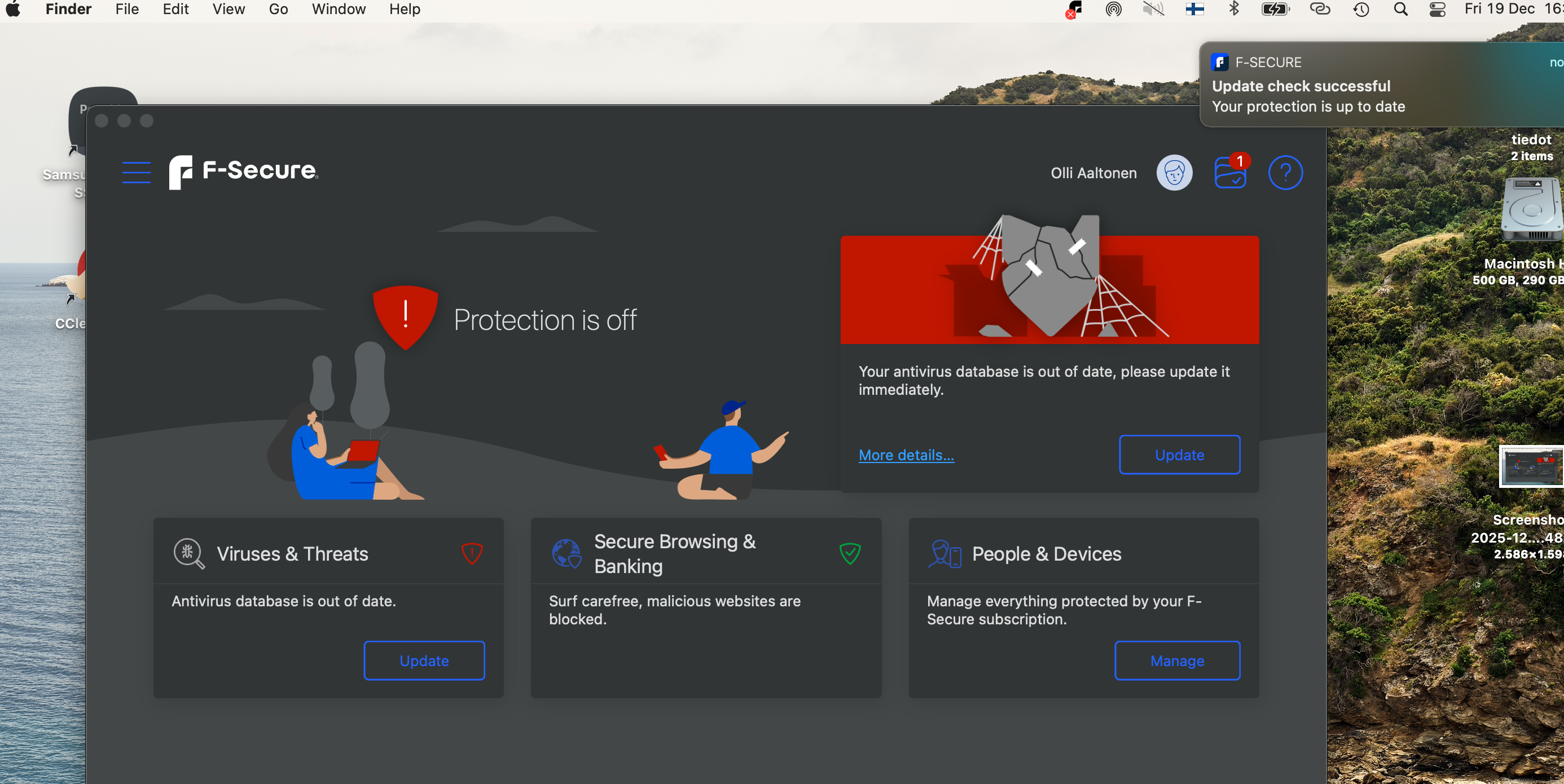
Updating produces conflickting information about the status of the database

Accepted Answer
-
Hello,
I am not familiar with macOS either, but your UI (in the screenshot) looks more like the older version (user interface style which was 'unified' between platforms like macOS and Windows; and mobile ones). Can you provide information about your macOS version and/or check if it is still on the supported list (System requirements)?
If it is an old/unsupported version or there something else like this (say, F-Secure Not Working on macOS with OpenCore Legacy Patcher (OCLP)) - then this conflict is kind of more explainable. You have the latest available components installed for the system, which are marked as outdated in general(?). You may have installed it long before the "end of support" date or something.
Also, may be interesting what is your F-Secure version (check 'About' of app and see its version). For example, there What's new in the F-Secure app for Mac - the latest one listed as "25.11". You may be stuck on an older version of F-Secure that cannot proceed with an upgrade.
// However, there were quite many discussions about troubles with updating AV databases and macOS in past. Just random search gives this topic (which may be irrelevant to your experience, but anyway) with 'fixed' trouble. And there surely more of them.
- https://community.f-secure.com/en/discussion/127365/antivirus-database-not-updating-anymore
Thanks!

Answers
-
Hi @Olli_A_47
For Window's PC's I know some of these update issues can be resolved with a restart and running the update again. I'm not sure how or what will work on a Mac, though.
Maybe another Mac member or employee here will help, otherwise, there are the off forum Support options:
-
-
Thanks, I think the answer was here. My F-secure database is 19.3 and the OS version is BigSur 11.7.x, which is not upgradable on my 2013 Macbook. It is not on the F-secure system requirements list.
F-secure works well on my newer computers, but I never thought it would stop on my Macbook which is still quite fresh considering my human age.
Better to skip F-secure altogether and seek alternatives.
Thanks fot the help !
-
Well, at least, the reason is known now. But it is not nice that it's not fixable one. :(
My F-secure database is 19.3 and the OS version is BigSur 11.7.x, which is not upgradable on my 2013 Macbook. It is not on the F-secure system requirements list.
Yes. However, it's possible that "in reality" the databases could still be up-to-date to this day (or up to some point). In legacy mode. It's just that the product version itself and some "technologies" were at version 19.3 (which would still receive updates to it). If a notification like the one in the screenshot appeared only recently, then it's likely that they stopped arriving at some point (a week or a month) and, accordingly, the product notified about the out-of-date condition.
Based on release notes, F-Secure version 19.4 (build 60838) [Released December 2023] comes with macOS 11 (Big Sur) dropped [[Support for macOS 11 (Big Sur) is dropped in this release.]]
It seems that this is because they decided to use the advanced capabilities of the system. Because release notes says about new feature: New antivirus protection implementation (Added a new and improved antivirus component. The component has been rebuilt to optimize it for modern macOS systems, improve performance, and enrich the feature set).
F-secure works well on my newer computers, but I never thought it would stop on my Macbook which is still quite fresh
Better to skip F-secure altogether and seek alternatives.
It's a really frustrating situation. Because I use F-Secure (quite often) on one of my Windows laptops, I think, which is over 13 years old now. And before this - I used to be with F-Secure solutions on machines maybe like 15 years old and so on.
Those very old ones had to be stopped from being used, because the processor was so old that the most current and widely used instructions were not supported (which probably caused critical failures in the system and, accordingly, support for such machines was simply dropped by F-Secure software). Otherwise, it was possible to use even longer.
And current old laptop is likely to be with F-Secure as long as they support Windows 10 (then, the situation will be like with macOS Big Sur).
I found that for 'old' devices - F-Secure is my main choice. Although I think there are some good companies that can compete here.
Sorry for the comment. Thanks.