create bootdevice

I have a laptop and a desktopcomputer. On both devices F-secure is installed
Since yesterday my desktopcomputer has troubles and the systemtray is unreachabele and starting software from the startmenu also doesn't work.
To be sure the desktopcomputer is not infected, I want to create a boot-USB on my laptop. With this USB I can boot my desktopcoputer en scan all disks.
Is this the best sollution?
If yes, how do I do it of where can I read how to?
Answers
-
Hi @Romke
If you're concerned your issue is malware related, you can run a 2nd opinion online scan from ESET, or download and run a on demand scan (doesn't install and run in the background when it's done) of Norton Power Eraser. Both can be found in a Google search, just confirm it's the actual site. I take it for granted that you ran a F-Secure Full scan?
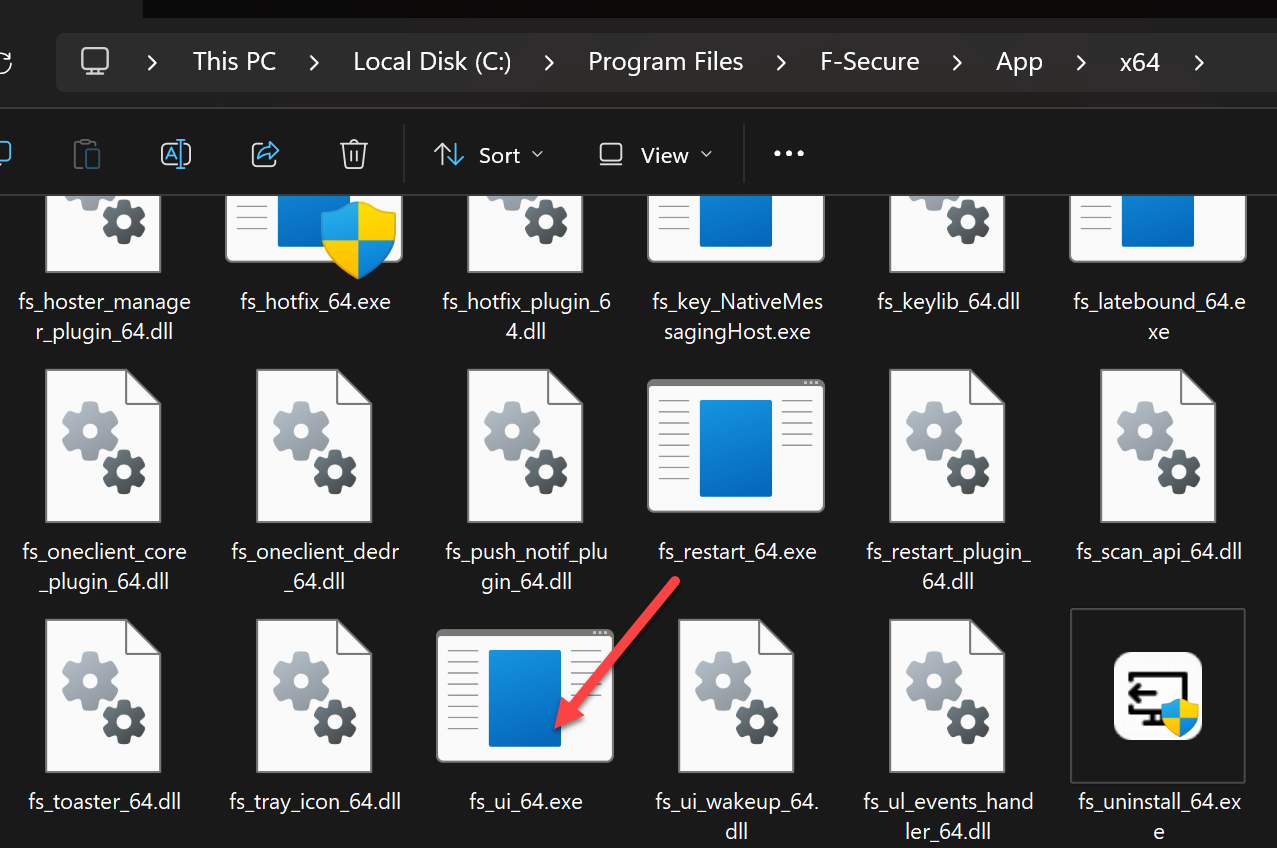
Edit: In case I'm realizing you may not be able to run a F-Secure scan from the desktop, does your keyboard work, where you can open the app from the file path shown in the image below?
You could also run in Command Prompt as an Admin "sfc/scannow" (without the parentheses) and see if that finds any issues to repair. You could also try running the Windows Troubleshooter. Again, if you can't get to Command Prompt from the Start menu, can you use the Windows Keyboard shortcut to get you there? As well as Windows + I to open the Settings for Troubleshooter? If needed, try a different USB for the keyboard?
Using the Run dialog with a keyboard shortcut
Press
Windows + Rto open the Run dialog, typecmd, and then pressCtrl + Shift + Enter.This will launch an elevated Command Prompt window, prompting you to confirm the action via User Account Control (UAC)Also, if the keyboard works: To open Microsoft Edge using a keyboard shortcut, press the Windows key + R to open the Run dialog box, type
microsoft-edge:in the Open field, and press Enter or click OK to launch the browser to access a online scanner or download NPE.You can do a AI (Gemini, Perplexity etc.) search (on the laptop) for creating a USB boot device, or search or ask in a forum like Malwaretips.com (very friendly and helpful), Wilders Security forum, or BleepingComputer.com etc. Otherwise, we tend to like to keep things F-Secure app related on the forum :)
Kind regards.
-
Hello,
Sorry for my comment. Just as a reference.
create bootdevice - Is this the best sollution?
If yes, how do I do it of where can I read how to?
I think the best approach is described by TVC15 in his answer. However, if some parts are not applied to your situation or impossible to perform; and like if there is a huge trouble with 'suspected' system, then…
To be sure the desktopcomputer is not infected, I want to create a boot-USB on my laptop. With this USB I can boot my desktopcoputer en scan all disks.
... there were/are special tools from cyber security companies like 'bootable' Live CD (/USB). For example, F-Secure had so called "F-Secure Rescue CD" (based on Knoppix, linux/debian-based live system). Mainly acting as a 'basic' scanner rather than feature-rich complex.
I don't know who else had this and who still has this, supports it and is relevant. I tried to do a quick search on some random companies to see if they were using anything like that now. Looks like ESET SysRescue Live and Trend Micro Rescue Disk are no longer available (as F-Secure Rescue CD), but others two big companies still do: Bootable Recovery Tool(?) is still described as 'available' and it looks like Kaspersky Rescue Disk wasn't ceased either. There is also G DATA BootMedium.
I think Emsisoft dis something like this too, but I couldn't find exactly that. Avast looks like hide their tool behind 'installation' (or, at least, what I read in their support article about Rescue Disk) - so - it is longer to get it. And I did not manage to download Avira's Rescue System (so, I am not sure if it is alive).
So I'm not sure what exactly you would try to get with a "boot-USB" - perhaps a "bootable" version of Windows or Linux, but it would likely be easy to do something wrong, or it wouldn't be enough anyway.
Thus, if @TVC15 answer above doesn't sort the problem out, you can look at these still alive Rescue Disks/Recovery Tools from well-known companies, each of which (in principle) provides detailed instructions on how to create and use their utility. But do check all limitations (otherwise, can be useless or dangerous).
-
I expected when having trouble with the Windows 11 User Interface, I needed a clean boot to be able to run a virusscanner and to erase found infections .
My problem was because of the behavior treated as an emergency and the answer of @TVC15 and other sources did me decide to first do set the Windows 11 OS back to a previous Restore Point.
Next I was able tot start F-secure and perform al full system scan. Fortunately nothing was found.
This was a good exercise on how to act when a emergency shows up. I also now know the software and the forurm does not expect users to have a emergency and I have to decide - based on several sources - fast how to solve my problem.
Thank you for your help.